Fireflies.ai Review (2026)
 By Daan Haket · Tested hands-on · written with an AI assistant · who does what
The advertised $10 and $19 are annual-billing rates; month-to-month is $18 and $29. Throughout this review we weigh it against Otter.ai.
teams that want every meeting transcribed and searchable automatically — the free unlimited-transcription tier is genuinely rare.
your meetings involve sensitive topics where an AI notetaker joining calls raises consent or confidentiality questions — check policy first.
Transparency: the “Visit” links on this page are affiliate links — we may earn a commission if you sign up, at no extra cost to you. No vendor can pay for a better review or verdict. How we make money →
The free plan on a new account. We uploaded one recording whose exact script we hold: the 2-minute-49 audio of our own Contabo video review, two synthetic voices and 377 words with prices, dates and product names. We compared the transcript word for word with the script, checked how it split the speakers, and read the AI summary and action items against what was said. In setup we chose the narrowest meeting settings: join only meetings we invite it to, recaps to the account owner only.
- The transcript was close: after evening out punctuation and number formats, 5.3% of the 377 words differed from the script. Product names such as Contabo, DigitalOcean, Cloud VPS 12, cPanel and Plesk came through.
- The errors sat where a buyer would care. '6.70 euros a month' came out as '6.€70amonth', 'the usual fine print' as 'the US fine print', and 'excluding VAT' dropped out of the sentence with the entry price, though a later sentence kept 'Prices on the page exclude vat'.
- Speaker detection found six speakers in a recording with two voices, and split single sentences across them.
Pricing (2026)
✓ Pricing re-verified 23 Oct 2026
Free $0 — free forever, unlimited transcription, limited AI summaries, 400 mins of storage per team, 20 AI credits. Pro $18/seat/mo month-to-month or $10/seat/mo billed annually — unlimited AI summaries, 8,000 mins of storage per seat, 20 AI credits. Business $29/seat/mo month-to-month or $19/seat/mo billed annually — unlimited storage, 30 AI credits. Enterprise $39/seat/mo, annual only — 50 AI credits, SSO/SCIM, HIPAA, private storage.
The plan prices are unchanged since our 31 August read. CORRECTION carried from that read: $10 and $19 are the annual rates, and month-to-month is 80% and 53% higher. What the cards do not say, the help guide does (read 16 October 2026). The 20/20/30/50 AI credits are a one-time allocation per account, not a monthly allowance: they are pooled for the whole workspace and do not grow with the number of seats, so a ten-seat Pro team shares the same 20 credits as one person on Free.
Full pricing notes (6 more paragraphs)
More credits are a separate subscription: 50 for $5 a month ($4 billed annually), 200 for $20 ($16), 1,000 for $90 ($72), 2,500 for $200 ($160), 5,000 for $375 ($300), 7,500 for $450 ($360) and 10,000 for $600 ($480). Unused purchased credits do not carry over to the next billing cycle, and cancelling that add-on is separate from cancelling your main plan.
The billing guide says a 7-day AI-credit trial converts to a paid AI credits subscription at $5 a month (or the plan you picked at the start) and that Auto-Upgrade is on by default, while the terms of service say Auto-Upgrade is off by default and needs your express consent; check the setting in your own billing page before you start that trial.
The same billing guide (read 23 October 2026) adds that on a paid plan, once the one-time credits run out and you have no AI credits subscription, “Fireflies automatically subscribes you to the lowest AI credits tier ($5/month for 50 credits)”, and an existing credits subscriber who runs out is moved up to the next tier; Free users get a paywall instead of a charge.
Daily Digest and Meeting Prep are on by default and use credits, so switch them off in AI Skills settings if you do not want them. Uploaded recordings from outside meetings have their own meter: 3,000 minutes per source per month for individuals, with overage charged at $0.01 a minute. Storage counts the total minutes you keep, not minutes per month. Cancelling takes effect at the end of the paid period, and the terms ask you to cancel at least 24 hours before renewal.
Refunds are where Fireflies' own pages disagree: the dedicated refund article allows a full refund within 7 days if you logged 3 meetings or fewer on a monthly plan, or 20 or fewer on an annual plan, with no pro-rated refund on annual plans and none on AI credits, while an older account article still says they don't offer refunds on subscriptions or AI credit purchases.
Treat the 7-day window as the vendor's current policy, but ask support in writing before relying on it.
Plans change — always verify the live price on their site.
Category context: Communication & Voice. Across the 22 tools in this category that we researched with a public US-dollar price, the median entry price is about $30 a month (lowest paid plan as listed, per seat where the vendor prices per seat). Fireflies.ai’s entry price of $10 a month sits below that median. Compare pricing conditions in the Software Cost Atlas →
What the pricing page doesn’t say
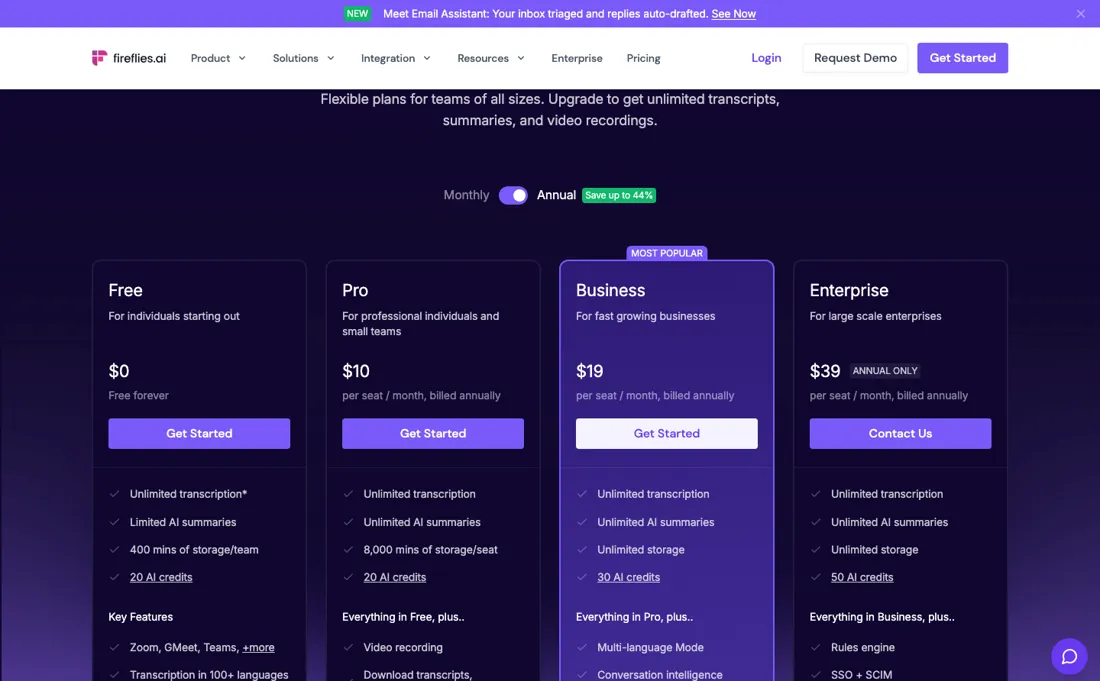
And AI credits are capped on every tier — Pro carries the same 20 a month as the free plan, so upgrading to Pro buys recording and storage rather than more AI. If you mainly want real-time in-Zoom captioning and simple English notes, Otter is the simpler pick.
Watch the video review
The video version of this review, from our YouTube channel.
⚡ Short on time? Watch the 30-second verdict Short.
What Fireflies.ai does
AI meeting assistant that records, transcribes and summarizes your calls across Zoom, Google Meet and Teams — searchable notes, action items and CRM sync, so nobody takes minutes by hand.
What buyers report about Fireflies.ai
Hands-on: tested 2026-10-09Reported by buyers: G2 and court filings, read August 2026
Themes from the buyer-review sites listed at the foot of this page, read in August 2026. We tested Fireflies.ai ourselves on 2026-10-09, but one test is a narrow sample, so here is what other buyers report. We summarise it here because the complaints are usually the part a vendor page leaves out.
- • 4.7 on G2 across 746 reviews — transcription and summarisation are what people rate, and the complaints are real but not the majority experience.
- • Pro at $10 per user on annual billing is cheap for what it replaces.
- • In March 2026 a class action was filed against Fireflies.AI Corp alleging it collects voiceprints without the notice and written consent Illinois BIPA requires. That is an allegation, not a finding — but if you record meetings with staff or customers, consent is your exposure too, not only theirs.
- • AI inaccuracy is the top negative tag at 39 mentions, followed by expensive (26), AI limitations (23) and poor summarisation (21). Accents, overlapping speech and jargon are where it slips.
- • Billing and cancellation friction is named as the number one risk across all tiers.
- • AI credit packs run $5 to $600, and heavy users report unexpected charges.
When the paid plan is worth it
The free plan is the unusual part: transcription is unlimited and it is the AI layer that is metered. So the question is never whether you can afford to record your meetings — you can, at zero — but whether the summarising and search layer earns its seat price. Read the headline numbers carefully, because they are the annual rates. Pro is $10 per seat a month billed annually and $18 month-to-month; Business is $19 annually and $29 month-to-month; Enterprise is $39 per seat and annual only (read 2026-08-31 on their own pricing page).
Ten people on Business is $190 a month on an annual commitment and $290 without one — a difference no feature comparison shows you. What upgrading does not fix is AI credits, and Pro is where that bites: Free and Pro both carry 20 a month. Paying for Pro buys video recording, downloads and 8,000 minutes of storage a seat — not more AI processing. Credits rise only at Business (30) and Enterprise (50), so if AI volume is your constraint, Pro is not the answer to it.
Our monthly capture read this vendor's pricing page every month from July 2026 to October 2026, and the amounts were the same all 4 times, including $18, $19, $29 and $39 from the pricing above. We keep watching — the registry records what moves.
What we found running Fireflies.ai ourselves
The first findings are at the top of this page. The rest:
- The AI summary had the facts right: the 24-month prepaid term, about 25% more month to month, backups at 6.70 euros and the DigitalOcean comparison. Its one action item was assigned to 'Daniel Cho', a name that is not spoken anywhere in the recording.
- The free plan's 'unlimited transcription' depends on your settings. In setup the switch for unlimited free transcripts sits beside the line 'Users on Join-All and Share-All settings get unlimited meeting transcripts': Fireflies joining every meeting with a link and sending recaps to everyone on the invite. Our narrower choice switched it off, and the account then showed '3 Free meetings'.
- Right after the upload the app offered a 7-day Business trial, noting that billing may increase with usage once credits run out. We declined it, and the file was transcribed on the free plan.
What this test does not show:
- live meetings in Zoom, Meet or Teams, other languages, real people talking over each other or background noise, and the paid plans
The transcript and the word error rate can be re-checked from the files we kept; the other observations in this test have no separate session record.
Most of our reviews are researched rather than run — how we review explains which is which, and why we do not pretend otherwise.
How to actually use Fireflies.ai
First value is a transcript, and the fastest route is the calendar connection rather than the app: connect Google or Microsoft calendar and Fireflies joins scheduled meetings as a participant. For one-off calls, invite the notetaker directly. Before you roll it out to a team, count AI credits rather than seats. Free and Pro both include 20 a month, so a Pro rollout buys recording, downloads and storage but no additional AI processing.
Track how many meetings actually get summarised in month one — that number, not headcount, tells you whether Business is warranted. Check storage against the same reality: Free gives 400 minutes for the whole team, Pro 8,000 minutes per seat, Business unlimited. Then decide where transcripts land. One that arrives in the CRM gets read; one that stays in Fireflies does not. The vendor's guide covers the integrations and the troubleshooting path for failed transcriptions.
Distilled from Vendor pricing page https://fireflies.ai/pricing (read 2026-08-31, from a European exit — tier cards, monthly-versus-annual toggle, AI-credit and storage rows); Fireflies help guide https://guide.fireflies.ai/ (read 2026-08-31 — getting started, integrations, troubleshooting failed transcriptions); Fireflies machine-readable index https://fireflies.ai/llms-full.txt (read 2026-08-31). Re-read 2026-10-16 on https://fireflies.ai/pricing, https://fireflies.ai/terms-of-service and the help articles on AI credits (guide.fireflies.ai/articles/2114151875), AI-credit billing (9606045468), refunds (8731544498 and 4475230290) and upload limits (2631950139). Re-read 2026-10-23 on https://fireflies.ai/pricing and the AI-credits help article (guide.fireflies.ai/articles/2114151875): plan and credit prices unchanged; auto-subscribe on credit exhaustion added.
The natural comparison is Otter or Fathom — the other AI meeting-note takers. Weigh it against Otter.ai on the job you actually need done.
Frequently asked questions
Is transcription on the free plan really unlimited?
Only with Fireflies' widest settings. In our test on 9 October 2026 the switch for unlimited free transcripts sat beside the line 'Users on Join-All and Share-All settings get unlimited meeting transcripts': Fireflies joins every meeting that has a link and sends recaps to everyone invited. With the narrower choice (join only when invited, recaps to the account owner) the account showed '3 Free meetings' instead. The pricing page, read 31 August 2026, lists Free at $0 with unlimited transcription and 400 minutes of storage per team.
Does Pro give me more AI credits than the free plan?
No. On the pricing page read 31 August 2026, Free and Pro both include 20 AI credits; Business has 30 and Enterprise 50. What Pro adds is unlimited AI summaries and 8,000 minutes of storage per seat, at $10 a seat a month billed annually or $18 month to month.
Can I trust the transcript for prices and numbers?
Check them before you act on them. In our 9 October 2026 test on a 377-word recording whose script we hold, 5.3% of the words differed and product names came through, but '6.70 euros a month' came out as '6.€70amonth' and 'excluding VAT' dropped out of the sentence with the entry price. The AI summary had the figures right, yet assigned its action item to a name nobody said.
Is this a hands-on review of Fireflies.ai?
Yes. We tested Fireflies.ai ourselves on 2026-10-09; the section above says what we tested, what we found and what we did not test, and where a figure comes from the vendor's own documentation instead. Most of our reviews are researched rather than run; we say which is which. We name what each tool is good and bad at, and we earn a commission only if you sign up, at no cost to you.
- Buyer reviews on G2 and court filings, read August 2026.
- Price re-verified 2026-10-23 against the vendor's own pricing page and help guide.
- A dated screenshot of that pricing page, kept on this site as the receipt.
- Our own hands-on session with Fireflies.ai (2026-10-09), written up in full further down this page.
Others in this category
Reviewed communication & voice tools that share ground with Fireflies.ai — comparable in what they do, not drop-in swaps:
New reviews, price changes we recorded, and the cost conditions we found. No sponsored placements. Unsubscribe anytime.
This is our researched assessment — not a paid placement. The “Visit” links on this page are affiliate links: we may earn a commission if you sign up, at no extra cost to you, and it never changes our take. How we review →