ZenZap Review (2026)Flat Packages Replace Seats
 By Daan Haket · Tested hands-on · written with an AI assistant · who does what
The pricing genuinely undercuts Slack — the honest question is ecosystem: team chat lives or dies on integrations and habit, and ZenZap's app catalog is a fraction of Slack's, so teams glued to hundreds of integrations will feel the gap. Throughout this review we weigh it against Slack.
small teams that run work over messy WhatsApp/personal chat today and want organized, professional chat with tasks — starting free.
your workflows depend on a deep integration ecosystem (Slack's moat), or you're already paid into Microsoft Teams via 365.
Transparency: the “Visit” links on this page are affiliate links — we may earn a commission if you sign up, at no extra cost to you. No vendor can pay for a better review or verdict. How we make money →
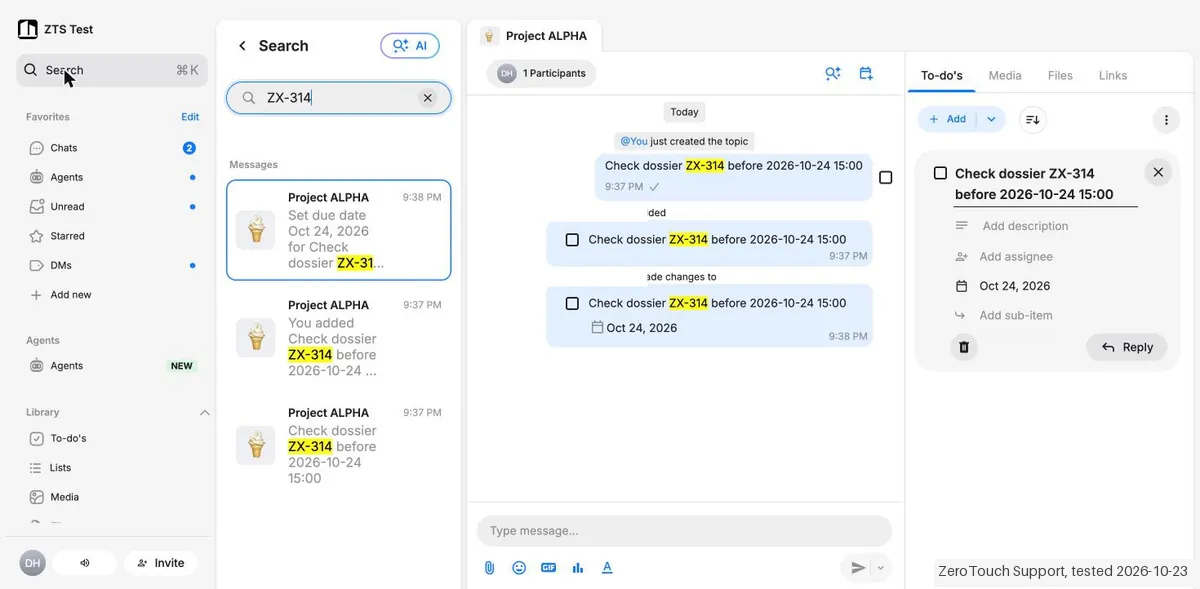
Tested by our team on 23 October 2026 on a new workspace with data in Europe, without a card, without connecting a calendar or other tools and without inviting team members: Daan signed up with a phone number and SMS code, and our AI assistant set up the workspace in Daan's browser through the web app. We made a group, posted a message with a test code, turned it into a to-do with a due date, searched for the code and completed the to-do. Plan name: not recorded.
How we tested
- Completed SMS onboarding and created the required first agent
- Created a private project group chat
- Posted a message containing a unique search marker
- Turned that message into a to-do and selected a due date
- Searched the workspace for the message marker
- Completed the to-do and checked the Library count
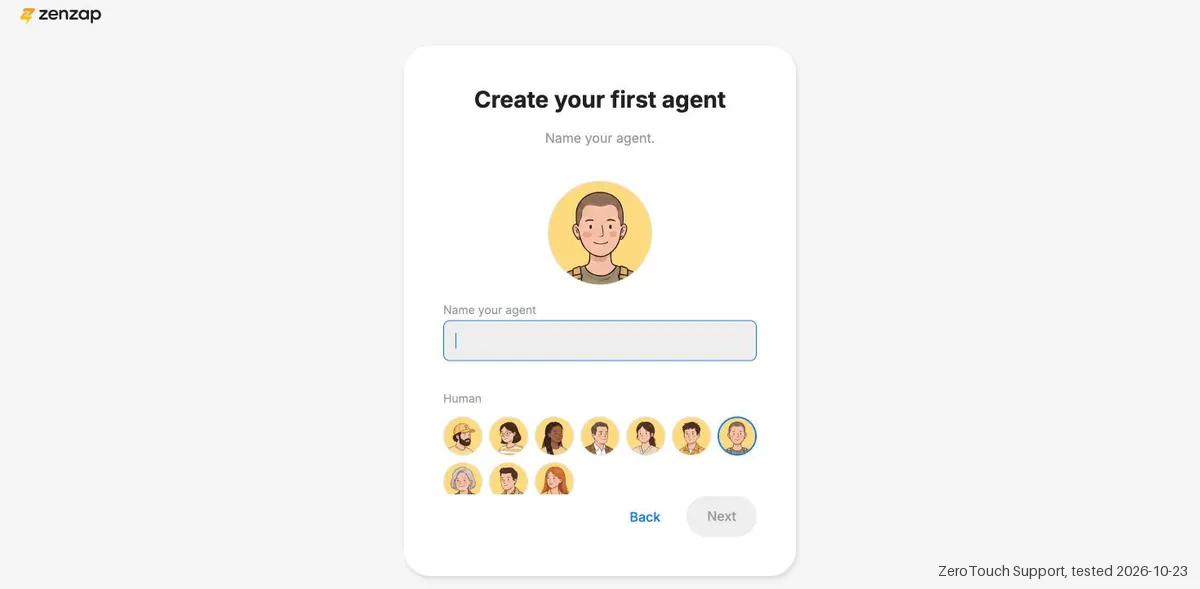
- Sign-up works only with a mobile number and a six-digit SMS code ('Sign in with email' is for existing users). Onboarding now presents Zenzap as an agent platform: after the workspace it asks who you are building agents for, your company size, role, industry and tools, and you must create your first agent (a name and an avatar) before you reach the chat. Skipping team invites asks for confirmation ('Start without your team?'). No card or sales call.
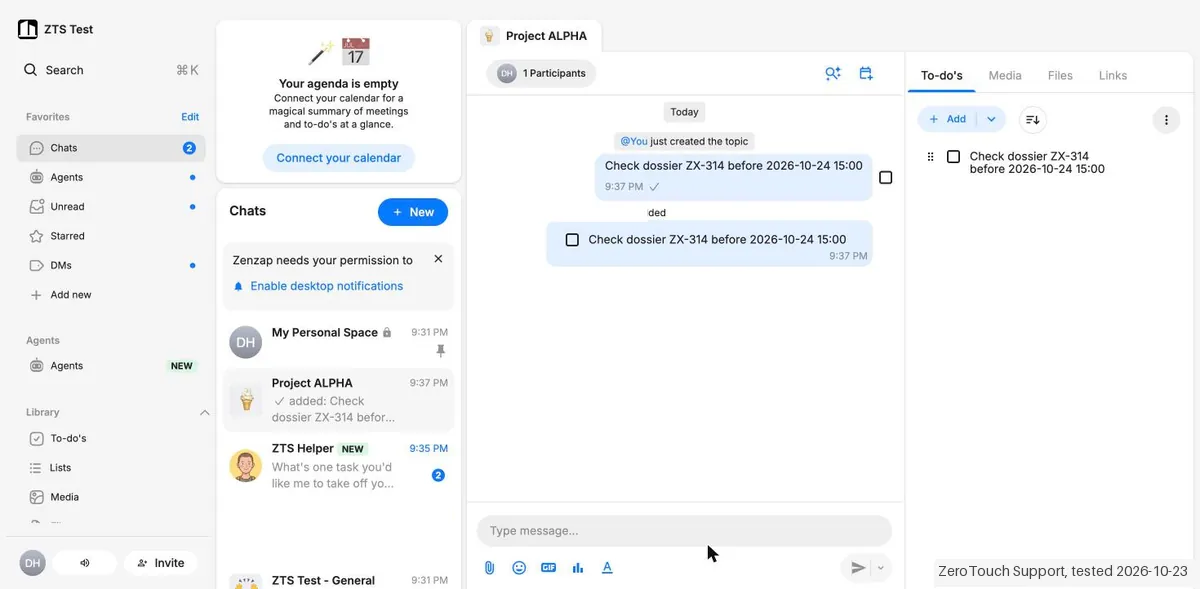
- A message becomes a to-do through the message menu (⋮ > Add to-do): it appears in the To-do panel next to the chat and as a card in the chat. A due date is set with a calendar (time optional, with 'Show in my calendar'), and the chat logs each change. The checkbox next to a message only selects it for forwarding or replying; it does not create a to-do.
- Searching the test code found 3 hits, all under 'Messages': the message itself, the 'added to-do' event and the 'Set due date' event. There was no separate group for to-dos in the results, and an 'AI' button sits next to search.
Pricing (2026)
✓ Pricing re-verified 15 Oct 2026
The per-seat prices are gone. On 1 September the page sold Pro at $3 a user a month billed yearly ($4 monthly) and Business+ at $8 ($10 monthly), with flat team bundles beside them; our 1 October capture and the page on 7 October sell flat monthly packages only, in two tabs. Under 'Just chat': Free at $0, 'forever free for your whole team', with group chats and DMs, built-in to-dos, scheduled messages, calendar integration, WhatsApp chat migration, team access and permissions, malware scanning of files, 1 GB of storage, AI voice-note transcription and in-chat search; and Lite at $51 a month in total for up to 20 users on annual billing ($63 month to month), adding voice and video calls, task templates and sub-tasks, team privacy and download controls, group-creation permissions, 100 GB of storage, AI workspace search and turning messages into tasks.
Under 'AI agents in chat': Free at $0 with 'every feature, every integration', unlimited users and 100 AI credits a month; and Business+ at $50 a month in total for up to 5 users on annual billing ($62 month to month) with 400 AI credits a month, AI work agents for every user, automated workflows, third-party agents, API access, call recording with transcription and 10 TB of storage.
Full pricing notes (2 more paragraphs)
Enterprise is custom in both tabs and carries SAML, SCIM and SSO, encryption key management and audit logs. Add-ons are listed without prices: extra AI credits, extra storage, an HR-system integration and HIPAA compliance with a signed BAA. External guests such as clients and contractors do not count toward a plan's user limit. The page says annual billing saves up to 33%; the two cards we read save about 19%.
The cards print no price for more users than the package covers, so ask before you plan a bigger rollout.
Plans change — always verify the live price on their site.
Category context: Communication & Voice. Across the 22 tools in this category that we researched with a public US-dollar price, the median entry price is about $30 a month (lowest paid plan as listed, per seat where the vendor prices per seat). ZenZap’s entry price of $51 a month sits above that median. Compare pricing conditions in the Software Cost Atlas →
What the pricing page doesn’t say
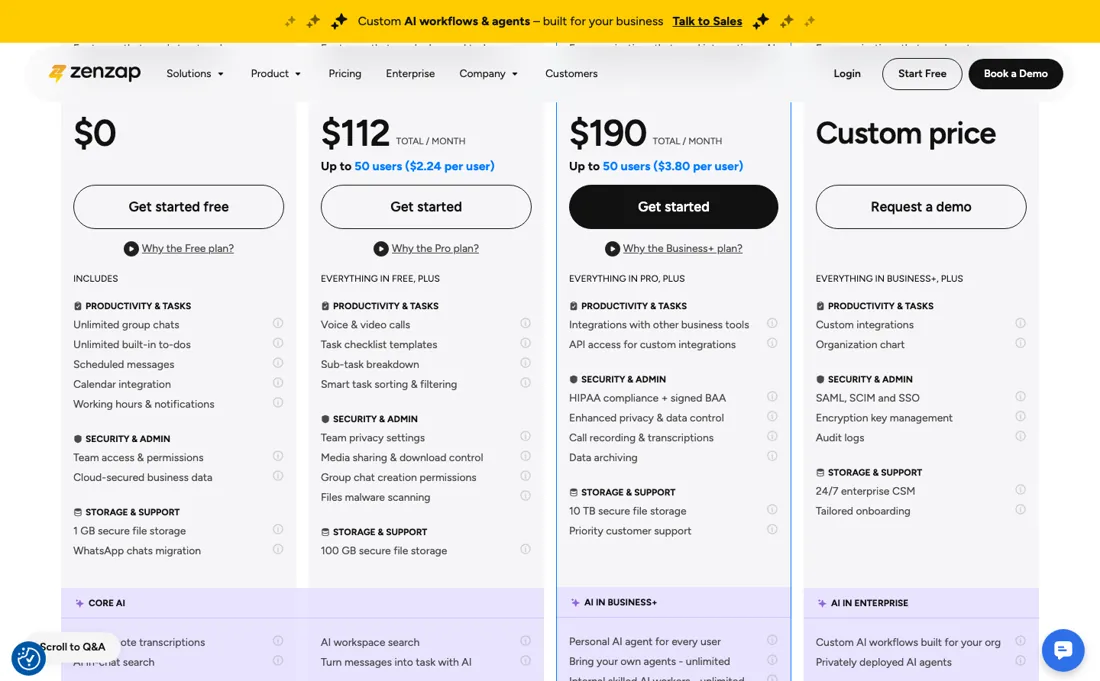
For WhatsApp-refugee teams that mainly need organized channels, tasks and work/life separation, the free tier is a remarkably complete landing spot.
Watch the video review
The video version of this review, from our YouTube channel.
⚡ Short on time? Watch the 30-second verdict Short.
What ZenZap does
Secure work-chat for teams — organized channels, built-in tasks and workflows, AI agents and admin controls, as easy to use as texting.
What buyers report about ZenZap
Hands-on: tested 2026-10-23Reported by buyers: G2, Capterra, GetApp and Software Advice, read August 2026
Themes from the buyer-review sites listed at the foot of this page, read in August 2026. We tested ZenZap ourselves on 2026-10-23, but one test is a narrow sample, so here is what other buyers report. We summarise it here because the complaints are usually the part a vendor page leaves out.
- • Keeping work messaging out of personal WhatsApp is the whole point, and reviewers say it achieves that without becoming complicated.
- • $3 per user on Pro, $8 on Business+, with a free tier at 1 GB and 5 project chats.
- • Reviewers report service interruptions with no proactive communication, and support emails going unanswered. For a tool a team depends on daily, that is the risk.
- • Notifications and file uploads are glitchy.
- • Integrations are limited and sit on Business+ along with API access.
Packages, not seats: 20 users on Lite, 5 on Business+
ZenZap no longer sells seats. Since our September reading the page prices flat monthly packages: Lite at $51 a month for up to 20 users billed yearly ($63 month to month), and Business+ at $50 a month for up to 5 users billed yearly ($62), with Enterprise on quote (re-read 2026-10-07 on the vendor's own pricing page). The two paid packages answer different questions. Lite is the chat upgrade: voice and video calls, task templates and sub-tasks, privacy and download controls and 100 GB of storage for a team of up to twenty, which is about $2.55 a user if you fill it.
Business+ is the AI upgrade: AI work agents for every user, automated workflows, third-party agents, API access, call recording and 400 AI credits a month, but for five users. A team of twelve that wants the agents is past the card, and the page prints no price for that. The free plan is still a real landing spot. In the 'Just chat' tab it is forever free for the whole team with group chats, built-in to-dos, WhatsApp chat migration and 1 GB of storage; in the 'AI agents in chat' tab Free lists every feature and every integration, unlimited users and 100 AI credits a month.
Check which tab you are reading before you compare. What no package below Enterprise buys: audit logs, SSO and SAML/SCIM. If a security questionnaire asks for those, neither $50 nor $51 a month gets you there.
Our monthly capture read this pricing page in September 2026 and again in October 2026. September's page priced per seat: Pro at $3 a user a month and Business+ at $8 on annual billing, with flat bundles beside them. October's sells flat packages only: Lite at $51 a month for up to 20 users and Business+, now the plan with the AI agents, at $50 a month for up to 5 users, both on annual billing ($63 and $62 monthly). Twenty users on Business+ cost $89 a month in September; the page now prints no price above five.
What we found running ZenZap ourselves
The first findings are at the top of this page. The rest:
- Ticking off the to-do moved it to 'Completed to-do's' with strikethrough, the chat logged 'marked as Done', and Library > To-do's then showed 0 open.
- The new workspace already held 'My Personal Space', a general channel, a welcome message from a Zenzap staff member and a message from our own agent.
Mail in the first 14 days
Measurement running until 2026-11-05T23:00:00Z (last observed 2026-10-27T02:18:01.949814Z).
2 emails in the 14-day window so far; first email after signup: unknown (exact signup time not recorded); 0 with an explicit offer.
Retained inbox and junk only; removed or archived mail is outside this observation. Ambiguous supplier attribution is excluded. Day numbers use elapsed 24-hour periods since the recorded signup date at midnight Europe/Amsterdam; the signup hour is unknown. Offer flags quote literal subject/body text. Replies in our own correspondence (support tickets, our comment requests) are excluded; one-time codes, our own address, our account name and our name are replaced in brackets.
| Day | Time (UTC) | Sender | Literal subject | Folder | Offer evidence |
|---|---|---|---|---|---|
| Day 0 | 2026-10-23 19:40:49 UTC | ZenZap team / getzenzap.com | Welcome to Zenzap - get more done with your team and AI agents | inbox | |
| Day 0 | 2026-10-23 19:54:50 UTC | ZenZap team / getzenzap.com | Welcome to Zenzap - get more done with AI agents for work | inbox |
Screenshots from our test (click to enlarge)
What this test does not show:
- Letting agents do work, and connections with tools or a calendar
- Working hours and notifications
- A second user or an external contact
- The mobile app, calls, workflows and paid plans
Most of our reviews are researched rather than run — how we review explains which is which, and why we do not pretend otherwise.
How to actually use ZenZap
Pick the tab before you pick the plan. The pricing page has two, 'Just chat' (Free and Lite) and 'AI agents in chat' (Free and Business+), and the word Free means a different bundle in each. Then count users against the package, not the seat. Lite covers up to 20 users for $51 a month on annual billing; Business+ covers up to 5 for $50. Past those numbers the cards print no price, so ask before a company-wide rollout.
External guests such as clients and contractors do not count toward the limit. Run the free plan properly. Group chats, built-in to-dos and WhatsApp chat migration mean you can move one project or one department across and let habit decide rather than a trial clock; storage stops at 1 GB on the chat-only Free plan. And keep Enterprise-shaped requirements out of the decision: audit logs, SSO and SAML/SCIM sit above every package, so a compliance list containing those is a different conversation with a different price.
Where this section comes from: our research notes (109 words)
zenzap.co/pricing — the plan cards, the flat-rate and per-user tables in both dollars and pounds, and the full feature-comparison table — read 2026-09-01. zenzap.co/llms.txt returns 404. Vendor sources only; no independent tutorial or user thread was consulted for this section. The buyer reports elsewhere on this page are not vendor sources: they come from G2, Capterra, GetApp and Software Advice, read August 2026. Re-read 15 October 2026 in a browser render: both tabs on both billing toggles (Business+ $50 annual / $62 monthly for up to 5 users, Lite $63 monthly for up to 20 users, unchanged) and the pricing-page FAQ on refunds, guests, user limits and plan changes.
The natural comparison is Slack or Teams — the giants — richer ecosystems at higher per-seat costs; ZenZap wins on price and simplicity for chat-first small teams. Weigh it against Slack on the job you actually need done.
Frequently asked questions
Can I get money back if I cancel a Zenzap annual plan?
Yes, according to the pricing FAQ (read 15 October 2026): cancelling an annual subscription early gives a prorated refund for the remaining unused months, and cancelling within the first 30 days gives a full refund. Plan changes, payment details and billing history sit in your account settings. So the roughly 19% annual saving on the two cards does not lock you in for the full year; confirm the refund terms in your own order before you rely on them.
Who counts toward the user limit?
Only your own team. The FAQ (read 15 October 2026) says external guests such as vendors, contractors and clients can join your chats without counting toward the plan's user limit, though each needs a free Zenzap account. On a flat-fee package you can add users up to its limit at no extra charge, and the whole workspace must be on one plan, so you cannot put a few people on Business+ and the rest on Lite. For more users than a package covers, the cards offer only a demo booking and no printed price.
Is this a hands-on review of ZenZap?
Yes. We tested ZenZap ourselves on 2026-10-23; the section above says what we tested, what we found and what we did not test, and where a figure comes from the vendor's own documentation instead. Most of our reviews are researched rather than run; we say which is which. We name what each tool is good and bad at, and we earn a commission only if you sign up, at no cost to you.
- Buyer reviews on G2, Capterra, GetApp and Software Advice, read August 2026.
- Re-read 2026-10-07 on the vendor's own pricing page; unchanged on 2026-10-15.
- A dated screenshot of that pricing page, kept on this site as the receipt.
- Our own hands-on session with ZenZap (2026-10-23), written up in full further down this page.
Others in this category
Reviewed communication & voice tools that share ground with ZenZap — comparable in what they do, not drop-in swaps:
New reviews, price changes we recorded, and the cost conditions we found. No sponsored placements. Unsubscribe anytime.
This is our researched assessment — not a paid placement. The “Visit” links on this page are affiliate links: we may earn a commission if you sign up, at no extra cost to you, and it never changes our take. How we review →