respond.io Review (2026)
 By Daan Haket · Researched and written with an AI assistant · who does what
The entry plan is the inbox without the engine.
a small team that already lives in WhatsApp and Instagram DMs and has outgrown a shared phone — retail, clinics, travel, local services. Per-contact pricing suits you if headcount grows faster than conversation volume, and the seven-day trial without a card lets you check that before committing.
you only need one channel: a plain shared inbox or a helpdesk will cost less than an omnichannel platform you use a fifth of. Skip the Starter plan specifically if automation is the reason you are looking — you will be on Growth within a month. And if your monthly active contacts run into the tens of thousands, get the number in writing first, because that is the meter and the published ladder stops being informative.
Transparency: the “Visit” links on this page are affiliate links — we may earn a commission if you sign up, at no extra cost to you. No vendor can pay for a better review or verdict. How we make money →
Pricing (2026)
✓ Pricing re-verified 11 Oct 2026
| Plan | Price | What you get |
|---|---|---|
| Starter | $79/month yearly billing or $99/month monthly billing | Team/custom inboxes, mobile app, AI Prompt, AI Assist, basic reports, 2FA; unlimited contacts, 5 users |
| Growth | $159/month yearly billing or $199/month monthly billing | Adds workflows automation, broadcasts, AI Agents, advanced reports, API, Zapier/Make; 10 users, starts at 1,000 contacts |
| Advanced | $279/month yearly billing or $349/month monthly billing | Adds multiple workspaces, SSO, webhooks, HTTP requests, phone-number masking; 10 users, starts at 1,000 contacts |
| Enterprise | no published price | On quote; button says “Talk to Sales” |
Summarised from the pricing notes below; the notes carry the conditions.
(2026-08-13, read off respond.io/pricing) Four tiers, billed on monthly active contacts rather than seats: Starter $79/month, Growth $159, Advanced $279, and Enterprise on quote. Paying yearly takes roughly 20% off — $948, $1,908 and $3,348 a year against $1,188, $2,388 and $4,188 monthly. The trial is 7 days and takes no card. What separates the tiers is not volume but capability, and the line matters: Starter buys team and custom inboxes, the mobile app, AI Prompt, AI Assist, basic reports and 2FA. **Workflows automation, broadcasts, AI Agents, advanced reports, the developer API and the Zapier and Make integrations all start at Growth.** Advanced adds multiple workspaces, SSO, webhooks, HTTP requests in workflows and phone-number masking, and although a figure is shown its button says “Talk to Sales”.
One thing we could not pin down. The page carries a selector for 1,000 / 2,500 / 5,000 / 10,000 / more than 10,000 monthly active contacts under the heading “pay only for the contacts you talk to”, but the prices we read did not move between those settings. Ask what your contact volume actually costs before you sign — that is the meter you are buying.
Full pricing notes (2 more paragraphs)
Re-verified 11 October 2026 on respond.io/pricing: the yearly totals ($948, $1,908, $3,348) and the monthly totals ($1,188, $2,388, $4,188) are unchanged. Read them carefully: the $79, $159 and $279 shown per month are the yearly rates, and the page data gives $99, $199 and $349 for month-to-month billing. The plan comparison now lists users per tier — 5 on Starter, 10 on Growth and Advanced, extra users at $12, $20 and $24 a month on yearly billing ($15, $25 and $30 monthly) — plus AI Credits of 5,000, 10,000, 20,000 and 40,000.
In that same table Starter shows unlimited monthly active contacts, while Growth and Advanced 'start with 1,000', so the contact meter applies from Growth up. The trial gives Growth features for 5 users and 1,000 contacts, without broadcasts.
Plans change — always verify the live price on their site.
Category context: Communication & Voice. Across the 22 tools in this category that we researched with a public US-dollar price, the median entry price is about $30 a month (lowest paid plan as listed, per seat where the vendor prices per seat). respond.io’s entry price of $79 a month sits above that median. Compare pricing conditions in the Software Cost Atlas →
What the pricing page doesn’t say
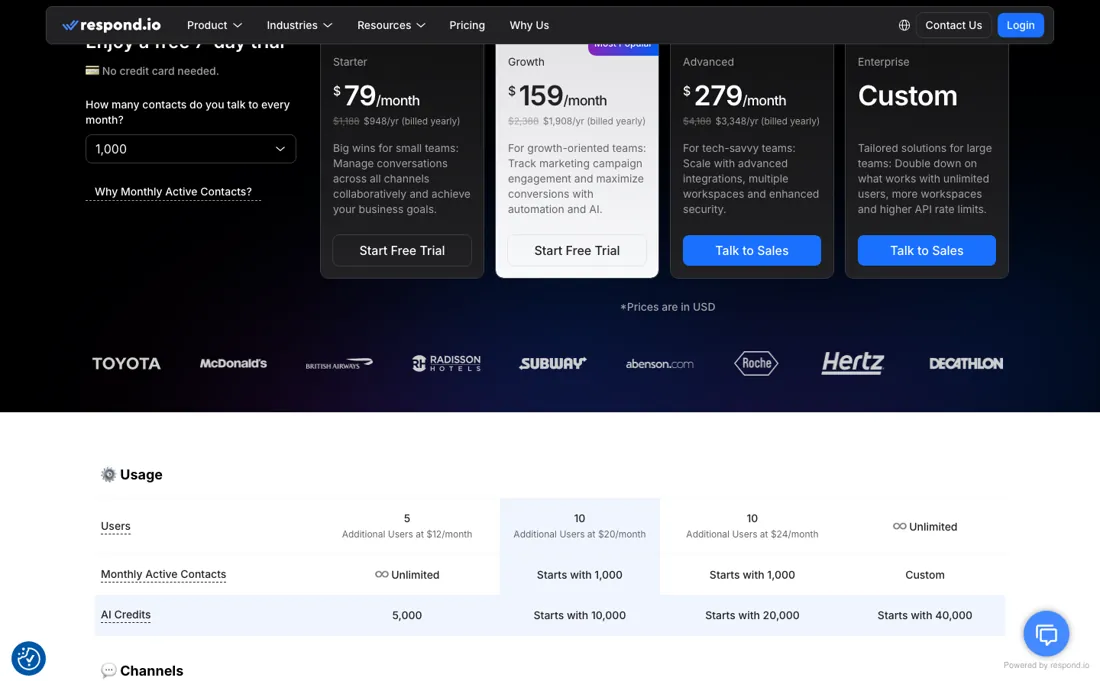
At $79 you get shared inboxes across WhatsApp, Instagram, Messenger, SMS and live chat, and that alone solves the “five people answering from one phone” problem. But workflow automation, broadcasts, AI Agents and the API — the things most people picture when they read “omnichannel platform” — begin at $159, so the real entry price for an automated setup is double the headline. Work out which side of that line you sit on before comparing it with anything else.
And note the meter: you pay per active contact per month, so cost follows how many people message you, not how many staff you add. That is kinder than per-seat pricing for a small team fielding a lot of chats, and harsher if you have a big list you talk to often.
Watch the video review
The video version of this review, from our YouTube channel.
What respond.io does
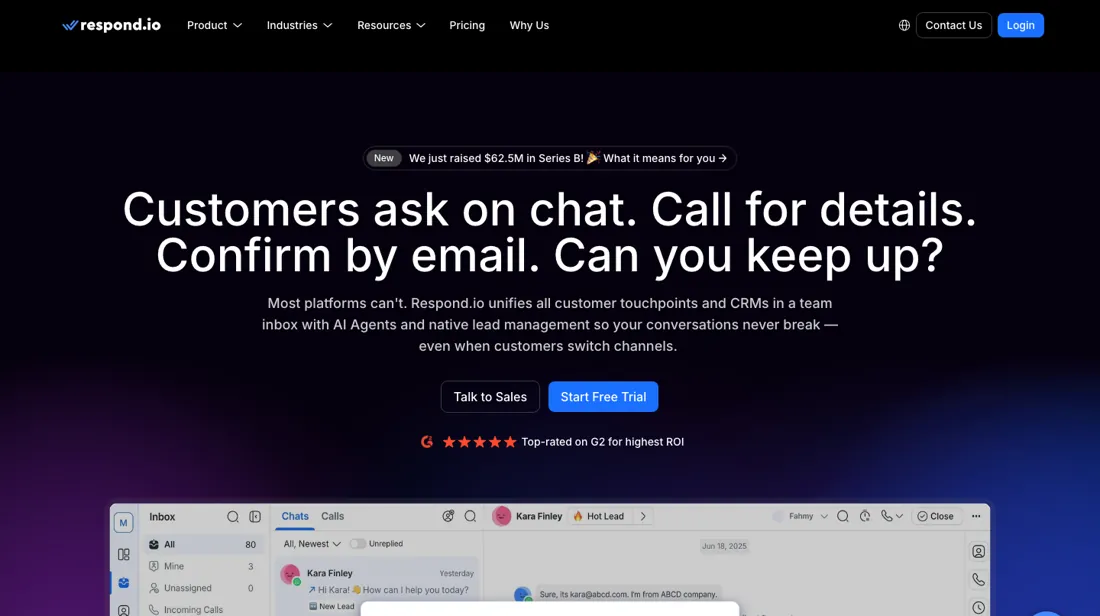
Shared inbox for WhatsApp, Instagram, Messenger, SMS, email and live chat, with workflow automation, broadcasts and AI agents on top.
What buyers report about respond.io
Hands-on: not tested by usReported by buyers: Capterra, read August 2026
Themes from the buyer-review sites listed at the foot of this page, read in August 2026. We have not run respond.io ourselves, so this is other buyers' experience rather than ours. We summarise it here because the complaints are usually the part a vendor page leaves out.
- • Consolidating WhatsApp, Instagram, Messenger, email and live chat into one inbox is the reason people stay — named in review after review as the thing that stopped several people answering from one phone (Capterra, September 2025).
- • The automation holds up at agency scale. A December 2025 reviewer running it across multiple outlets, business units and clients describes lead qualification, routing, follow-up and escalation logic that does not become fragile, and rates the CRM-style structure as rare in chat platforms.
- • Cost-effective lead handling and the reporting, from a Botswana reseller running it for partner-network sales (Capterra, June 2026).
- • It is not plug-and-play. The same reviewers who rate it highest say teams without clear SOPs overcomplicate it, integration takes technical know-how, and reports are limited to the platform's own templates rather than being customisable (Capterra, December 2025 and June 2026).
- • Billing is the complaint that survives every platform. Reviewers report being billed while the platform was not in use (April 2026), a refund refused after downtime made the product unusable (March 2026), and being told they had to pay for the months they had not been subscribed before they could rejoin (July 2026).
- • One reviewer describes long SMS messages being split into roughly 150-character chunks that arrive out of order or not at all, with support attributing it to the upstream carrier (Trustpilot, June 2026).
- • Partner status does not help when Meta is the problem: a January 2026 reviewer says WhatsApp Business API issues went unresolved despite the official-partner badge.
Where the ratings disagree. The two platforms disagree more sharply than usual: 4.6 from 60 on Capterra against 2.0 from 16 on Trustpilot, where 81% are one star. Trustpilot's own page notes the company has not invited reviews recently, so what lands there is unprompted — and unprompted reviews of a subscription tool skew to billing and cancellation. (That profile is also filed under a different company name and carries an archival notice, which is a further reason to weigh it carefully.) The informative part is the overlap: the same account of a frozen account that kept being charged appears on both platforms in August 2025 under the same reviewer's name. Product praise is real and billing complaints are real; they are not in contradiction.
Pages read (August 2026): Trustpilot
When the paid plan is worth it
The line between Starter and Growth is not volume, it is whether the product automates anything. Starter at $79 a month billed yearly ($99 month to month) buys team and custom inboxes, the mobile app, AI Prompt, AI Assist, basic reports and two-factor authentication -- a shared inbox, in other words. Workflow automation, broadcasts, AI Agents, advanced reports, the developer API and the Zapier and Make integrations all begin at Growth, at $159 a month billed yearly ($199 month to month).
If you are buying this to stop doing something by hand, Growth is the entry price and Starter is not a cheaper version of it. Advanced at $279 billed yearly ($349 month to month) adds multiple workspaces, SSO, webhooks, HTTP requests inside workflows and phone-number masking. Worth noting that although a figure is printed, its button reads “Talk to Sales”, so treat it as an indication. Paying yearly takes about 20% off across the board: $948, $1,908 and $3,348 a year against $1,188, $2,388 and $4,188 paid monthly.
One thing we could not resolve and you should ask about before signing. The pricing page carries a selector for 1,000 / 2,500 / 5,000 / 10,000 / more than 10,000 monthly active contacts under the heading “pay only for the contacts you talk to” -- but the prices we read did not change between those settings. Monthly active contacts is the meter this product bills on, so get your volume quoted in writing rather than inferring it from the page. The trial is 7 days and takes no card.
Our monthly capture read this vendor's pricing page every month from August 2026 to October 2026, and the amounts were the same all 3 times, including $1,908, $2,388, $3,348 and $4,188 from the pricing above. We keep watching — the registry records what moves.
Questions we are still checking
Facts about respond.io that would change a buying decision, and where we stand on each. An unanswered question does not mean the feature is missing; it means we have not confirmed it yet.
- What does a block of 100 extra monthly active contacts cost on Growth and Advanced? Still checking
Applies to: Growth, Advanced; MAC On-Demand.
Why it matters: overage is billed per 100 contacts on a separate invoice, but neither the pricing page source nor the billing article prints the rate.
Checked: respond.io help: Billing & Usage (2026-10-11); respond.io pricing page (2026-10-11)
Have a public source that answers one of these? How we review explains how we check and correct.
How to actually use respond.io
Connecting the channel is the whole setup, and two prerequisites sit outside respond.io. Your Meta Business Manager profile has to list a real, reachable business website — the docs are blunt: "A legitimate, publicly accessible business website is mandatory in your Business Info — without one, your WABA may be disabled." And set the account currency to USD first, which the docs call "crucial to avoid issues with sending business-initiated conversations, even when you have sufficient credits." The path runs Workspace Settings, Channels, Add Channel, the WhatsApp Business Platform card, Connect with Facebook, pick or create the Business portfolio and WhatsApp Business Account, then add and OTP-verify a number.
Distilled from respond.io help centre, WhatsApp Business Platform (API) Quick Start — prerequisites, phone-number rules, Meta Business Manager requirements and the ten connection steps (respond.io/help/whatsapp/whatsapp-api-quick-start), read 20 August 2026. Re-verified 11 October 2026 on respond.io/pricing (plan cards, plan comparison and FAQ) and the help article 'Billing & Usage' at help.respond.io/organization-settings/billing-usage (updated 26 August 2026), read 11 October 2026.
Common respond.io setup mistakes
Where respond.io setups actually go wrong, and what it costs you when they do. Same sources as the setup notes above — not from a walkthrough we ran ourselves.
Watch out for the number.
- It cannot already be registered on the WhatsApp personal or Business app — delete that account first — and Meta's free virtual number is "for testing purposes only": no approved display name, no Click-to-WhatsApp ads, no migration.
- Choosing to add a number later "will prevent the Channel from being connected." If the final screen reads Continue to feature setup rather than Finish, you are not done.
respond.io vs Wati, side by side
Each column shows the vendor’s own published entry price, read on the date shown. Entry prices can cover different services or units, so check what each one buys. We do not average them into a score.
Both names above are affiliate links: we may earn a commission if you sign up, at no extra cost to you. Neither changes what this table says.
The natural comparison is Wati — the comparison most WhatsApp-first teams will make, and one we have already researched. Both put a shared team inbox on top of the WhatsApp Business API; the practical difference is how the meter runs and where automation starts. respond.io reaches wider across channels — Instagram, Messenger, SMS, live chat and email in the same inbox — which is worth paying for only if you genuinely answer on more than one.
Frequently asked questions
Who counts as a monthly active contact, and what happens if I go over?
respond.io's help article 'Billing & Usage' (updated 26 August 2026, read 11 October 2026) counts a contact who sends or receives a message, excluding broadcasts, or makes or receives a call during the billing month; outbound messages that fail to send still count, except broadcasts. Above your tier, MAC On-Demand keeps messaging running and is billed per block of 100 extra contacts, with admin alerts at 90% and 100%. The rate per block is not printed on the pricing page or in that article: not confirmed. In the plan comparison on respond.io/pricing (read 11 October 2026) Starter shows unlimited monthly active contacts; Growth and Advanced start with 1,000.
Why would I get a second invoice each month?
Because overage is invoiced separately. The same article says the subscription invoice comes at the start of each cycle (once a year on annual billing), and a second, on-demand invoice covers contacts or AI Credits beyond your allowance. Extra AI Credits cost $15 per block of 1,000, rounded up, capped at 200% of your allowance, after which AI features pause until the next cycle; AI Credit On-Demand is not available on trials or legacy plans.
What happens to my inbox when I cancel?
Only an Organization Admin can cancel, under Billing & Usage, and it takes effect at the end of the current billing cycle. The article (read 11 October 2026) says that during cancellation incoming messages are not stored, workflows stop running and the organization is flagged for deletion after 30 days. Downgrades also wait for the next billing cycle; upgrades are immediate. Data Export appears in the pricing page's feature comparison, but which tiers include it is not readable in the page source: not confirmed.
Is this a hands-on review of respond.io?
This is a researched assessment, not a hands-on test — where we've used a tool ourselves, we say so explicitly. We name what each tool is good and bad at, and we earn a commission only if you sign up, at no cost to you.
- Buyer reviews on Capterra (4.6 from 60 reviews) and Trustpilot (2.0 from 16), read August 2026.
- 2026-08-13, read off respond.io/pricing.
- A dated screenshot of that pricing page, kept on this site as the receipt.
Others in this category
Reviewed communication & voice tools that share ground with respond.io — comparable in what they do, not drop-in swaps:
New reviews, price changes we recorded, and the cost conditions we found. No sponsored placements. Unsubscribe anytime.
This is our researched assessment — not a paid placement. The “Visit” links on this page are affiliate links: we may earn a commission if you sign up, at no extra cost to you, and it never changes our take. How we review →