Answering Service Care Review (2026)
 By Daan Haket · Researched and written with an AI assistant · who does what
Do the arithmetic before you pick a tier, because their own page does not.
a small business that loses money when a call goes to voicemail — trades, clinics, law and property firms — and wants real people answering around the clock without hiring a receptionist. It suits you especially if your call volume is genuinely low and predictable, because the plans are priced mainly in minutes and only a few extras (account manager, call recording, appointment setting) sit behind a higher tier.
your callers mostly want things a human does not need to do — order status, opening hours, a password reset — because you are paying per minute for a person to read them out. Skip it too if your volume is high and variable: at 500-plus minutes you are past the published ladder and into a custom quote, and per-minute billing makes a busy month expensive in a way a flat-rate provider would not.
Transparency: the “Visit” links on this page are affiliate links — we may earn a commission if you sign up, at no extra cost to you. No vendor can pay for a better review or verdict. How we make money →
Pricing (2026)
✓ Pricing re-verified 13 Oct 2026
(2026-09-10, re-verified 13 October 2026 on their own pricing page, both billing toggles) Four plans, priced on included minutes. Billed monthly: Starter $40 with zero minutes included and $1.75 per minute after that; Small Business $179 for 100 minutes, then $1.70; Pro $329 for 250 minutes, then $1.60; Enterprise $639 for 500 minutes, then $1.35. Paying a year upfront takes about 10% off the monthly rate: $161, $296 and $575 for the three larger plans, while Starter stays at $40.
There is also a $50 one-time start-up fee; it is still absent from the plan cards, but the page's FAQ now says plainly what it buys — customising the account, building your initial scripts and configuring routing. The plan cards no longer differ only in minutes (re-read 13 October 2026). Starter lists 24/7 cover, one phone number, call transfers, the portal and mobile app, email and SMS notifications, secure messaging, custom hold music, personalised greetings and usage reporting, with live multilingual answering shown at $1 a minute.
Full pricing notes (2 more paragraphs)
Small Business adds one Follow Me number (valued at $15), a dedicated account manager and live chat at $5 a chat; Pro adds free call recording (valued at $10); Enterprise adds free appointment setting and one free integration (each valued at $50). The FAQ says there is no long-term contract and that you can upgrade, downgrade or cancel. The same page now also sells an AI answering line on the same minute bundles: $40 (0 minutes), $80 (100), $195 (250) and $350 (500) a month billed monthly, with AI minutes at $0.85, $0.80, $0.75 and $0.70 and live minutes at $1.75, $1.70, $1.60 and $1.60.
One caution about the page itself: the explanatory text below the table still contradicts the table three times, quoting Pro at $319, Enterprise at $599 and Starter overage at $1.65. We have used the figures from the pricing table, which is the one the buttons act on.
Plans change — always verify the live price on their site.
Category context: Communication & Voice. Across the 22 tools in this category that we researched with a public US-dollar price, the median entry price is about $30 a month (lowest paid plan as listed, per seat where the vendor prices per seat). Answering Service Care’s entry price of $40 a month sits above that median. Compare pricing conditions in the Software Cost Atlas →
What the pricing page doesn’t say
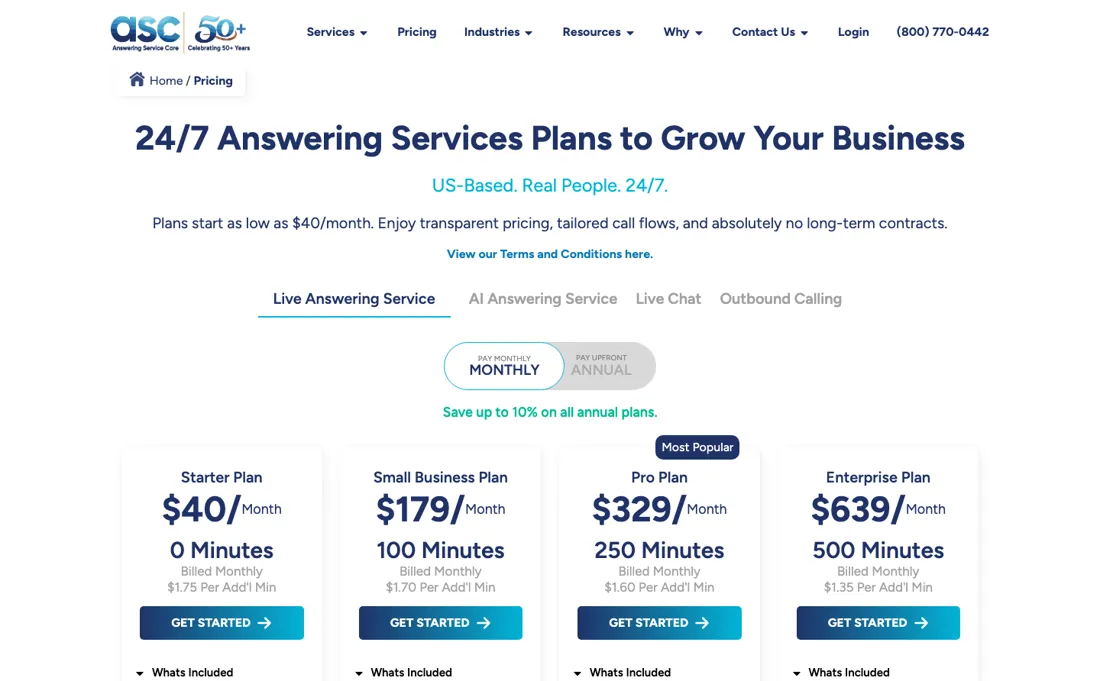
Starter buys the line and nothing else: at $40 plus $1.75 a minute, it stays the cheapest option only up to roughly 79 minutes a month — past that the $179 Small Business plan costs less. The same crossover logic repeats: Small Business gives way to Pro at about 188 minutes, and Pro gives way to Enterprise at about 444. Note too that Small Business is the one tier where an included minute ($1.79 each, $179 for 100) costs more than an overage minute ($1.70), so there is no saving in buying that bundle for its own sake.
And the second thing to price in is the $50 start-up fee, which is easy to miss where they have put it.
Watch the video review
The video version of this review, from our YouTube channel.
What Answering Service Care does
US-based live answering with real people, 24/7 and bilingual English/Spanish, with call transfers, SMS and email relays, a client portal and app on every plan.
What buyers report about Answering Service Care
Hands-on: not tested by usReported by buyers: Trustpilot, read August 2026
Themes from the buyer-review sites listed at the foot of this page, read in August 2026. We have not run Answering Service Care ourselves, so this is other buyers' experience rather than ours. We summarise it here because the complaints are usually the part a vendor page leaves out.
- • Message handling is the part long-term clients single out: reviewers describe getting the caller's name, callback number and the reason for the call delivered by text and email at the same time, which is what they say saves them the time.
- • Agent quality holds up even in the critical reviews. Several reviewers who complain about billing or answer speed still rate the operators themselves highly, and a number of them name individual agents.
- • Tenure is unusually visible: reviewers describe 10, 15 and 20-year relationships with the service, and a March 2026 reviewer describes onboarding as responsive, clear and promptly answered.
- • Calls nobody answered still bill as a minute. A March 2024 reviewer describes robocalls and instant hang-ups arriving on the number ASC provided, each billed as a full minute — roughly 30 minutes of instant hang-ups in the first month — and says the remedy offered was a robocall blocker at about $12 a month rather than a refund. A May 2025 reviewer reports the same one-minute no-agent calls with spam protection already switched on.
- • Cancelling is not immediate. The same March 2024 reviewer quotes the terms back: a full billing calendar month's notice is required, so the month you decide to leave is a month you still pay for.
- • The invoices themselves draw complaints. Two March 2023 reviewers call the billing system confusing — one says the bills run backwards and cannot be read — and object to being charged a processing fee for paying by credit card.
- • Answer and transfer delays come up repeatedly, including from a customer of more than ten years who had to escalate to management about how long the phone rang before it was picked up.
Where the ratings disagree. The score and the complaints are collected differently, so read them separately. Trustpilot shows 117 reviews at 4.1, with 70% five-star and 12% one-star, on a claimed profile with a paid Trustpilot subscription where the company invites customers to review. Most of the five-star entries arrived in an invited wave in March 2023; only four reviews landed in the last twelve months, and the detailed criticism — billing, per-minute charges on hang-ups, cancellation notice — is almost all unprompted. Take the operator praise from the invited reviews and the billing picture from the unprompted ones.
Pages read (August 2026): Trustpilot
When the paid plan is worth it
Do this sum before you pick the cheapest plan, because the cheapest plan stops being the cheapest at about 80 minutes a month. Starter is $40 and includes no minutes at all -- it is an access fee, and every minute costs $1.75 on top. Small Business is $179 and includes 100 minutes. So 100 minutes on Starter costs $40 plus $175, which is $215: thirty-six dollars more than the plan above it for exactly the same call volume.
The crossover sits at 79 minutes ($179 minus $40, divided by $1.75). Below that Starter wins; above it Starter is the expensive option with a small number on the card. Above Small Business you are buying a lower overage rate as much as a bigger bundle: $1.70 a minute on Small Business, $1.60 on Pro at $329 for 250 minutes, $1.35 on Enterprise at $639 for 500. Paying a year upfront takes roughly 10% off the three larger plans ($161, $296 and $575), and there is a $50 start-up fee, absent from the plan cards but spelled out in the page's FAQ.
Besides minutes, the extra money buys a short list of extras that the plan cards now name (re-read 13 October 2026): a dedicated account manager and one Follow Me number from Small Business, call recording from Pro, appointment setting and one integration from Enterprise. What upgrading does not solve: it does not make a long call cheaper per minute than the overage rate of your tier, and the page does not say whether the $1-a-minute tag the Starter card puts on live multilingual answering is waived higher up.
There is no long-term contract, so estimate low and move up rather than the reverse.
Questions we are still checking
Facts about Answering Service Care that would change a buying decision, and where we stand on each. An unanswered question does not mean the feature is missing; it means we have not confirmed it yet.
- In what increment are live call minutes billed (per second, rounded up to the minute, or a minimum per call)? Still checking
Applies to: all live answering plans, overage $1.35-$1.75 a minute.
Why it matters: with calls averaging a few minutes, rounding up per call can change the monthly bill materially and decides how the per-minute rate compares with another service.
Checked: Answering Service Care pricing page FAQ (2026-10-13) - Is the $1-a-minute tag for live multilingual answering on the Starter card a surcharge on top of the minute rate, and is it waived on higher plans? Still checking
Applies to: Starter card lists 'Live Multilingual ($1/Min)'; higher cards say 'Starter Plan +' without mentioning it.
Why it matters: for a business with Spanish-speaking callers it can add more than half again to every minute.
Checked: Answering Service Care pricing page plan cards (2026-10-13)
Have a public source that answers one of these? How we review explains how we check and correct.
How to actually use Answering Service Care
Two things shape the first week and neither is on a plan card. There is a one-time $50 setup fee, and the FAQ says what it buys: customising the account, building your initial scripts and configuring routing. That script work is the product -- operators only sound like your business if the call flow is written before go-live -- so treat it as the setup job rather than a fee to grumble about.
You do not need a new number; you keep the one you have and forward it. Then choose how messages reach you, because the options are not equal. Answering Service Care lists the mobile app, the web portal, SMS, email, fax and a phone call, and adds that outbound calls count towards your usage. A habit of asking to be phoned about every message therefore eats the minutes you bought. Usage itself is billed on the actual time spent handling live calls.
Distilled from The FAQ block on Answering Service Care's own pricing page (answeringservicecare.com/pricing/) -- the answers on the setup fee, on what is required to get started, on how messages are delivered and on keeping your existing number -- read 19 August 2026. Plan cards (including the per-plan extras and the separate AI answering line) and the full FAQ re-read on the same pricing page on 13 October 2026 in both billing toggles; annual totals shown were $1,933, $3,552 and $6,900 a year for the three larger plans.
Answering Service Care vs Ruby, side by side
Each column shows the vendor’s own published entry price, read on the date shown. Entry prices can cover different services or units, so check what each one buys. We do not average them into a score.
The Answering Service Care link above is an affiliate link — we may earn a commission if you sign up, at no extra cost to you — and the other column is a plain link. Neither changes what this table says.
The natural comparison is Ruby — the best-known US answering service and the comparison most buyers will make. Both sell live, US-based receptionists on a minute bundle; the practical difference is where your volume sits against each ladder and what a spare minute costs when you go over. Answering Service Care puts the core service — transfers, relays, the portal and app — on every plan, so the tier you choose is mostly a volume decision; only extras such as call recording and appointment setting move up the ladder.
Visit Answering Service Care →
Frequently asked questions
Does it cost minutes if the service phones me with messages?
Yes. The pricing page FAQ (answeringservicecare.com/pricing, read 13 October 2026) lists the mobile app, the web portal, SMS, email, fax and a phone call as ways to receive messages, and adds that outbound calls count towards your usage. Choose app, portal, SMS or email delivery if you want your bundle spent only on incoming calls.
Can I keep my existing business number?
Yes. The same FAQ (read 13 October 2026) says you do not change your number: they give you a dedicated forwarding number and you forward your existing line to it whenever you want them to answer, for example after hours, all day, or only when your lines are busy.
What exactly is billed as a minute?
The FAQ (read 13 October 2026) says call usage is calculated on the actual time spent handling your live calls. It does not state the billing increment (per second, rounded up to the minute, or otherwise), so that is not confirmed; ask for it in writing before you compare per-minute rates with another service.
Is this a hands-on review of Answering Service Care?
This is a researched assessment, not a hands-on test — where we've used a tool ourselves, we say so explicitly. We name what each tool is good and bad at, and we earn a commission only if you sign up, at no cost to you.
- Buyer reviews on Trustpilot, read August 2026.
- 2026-09-10, re-verified 13 October 2026 on their own pricing page, both billing toggles.
- A dated screenshot of that pricing page, kept on this site as the receipt.
Others in this category
Reviewed communication & voice tools that share ground with Answering Service Care — comparable in what they do, not drop-in swaps:
New reviews, price changes we recorded, and the cost conditions we found. No sponsored placements. Unsubscribe anytime.
This is our researched assessment — not a paid placement. The “Visit” links on this page are affiliate links: we may earn a commission if you sign up, at no extra cost to you, and it never changes our take. How we review →