Typewise Review (2026)From $99/mo Plus $1-2 a Resolution
 By Daan Haket · Tested hands-on · written with an AI assistant · who does what
The bill has two parts and both are published: a base fee from $99 and a resolution rate from $2 (pay as you go) down to $1 with volume packages.
customer-service teams with real ticket volume that want AI agents to resolve requests end to end and act inside the systems they already run — CRM, ERP, billing, commerce — with approval steps and human handover as they raise the automation level.
your helpdesk's built-in AI answers already absorb the volume, or your channel mix leans on phone support — their home page lists voice among the channels while their own SMB page still marks it "coming soon", so pin that down before you sign.
Transparency: the “Visit” links on this page are affiliate links — we may earn a commission if you sign up, at no extra cost to you. No vendor can pay for a better review or verdict. How we make money →
Exit test (measured 2026-10-23)
- Export route
- All tickets > Export all gives an Excel file straight away
- Formats
- XLSX
- Attachments included
- Not tested
- Re-import tested
- No
- Lost on export
- The full conversation messages: the export has only the summary per ticket; The knowledge sources and settings
Formats describe this export route; offered formats may not have been inspected. Full exit test and scope ↓
Tested by our team on 23 October 2026 during the trial, without a card, without connecting a channel and without publishing anything: Daan created the account and our AI assistant ran the test in Daan's browser, using only the Simulator. We gave the AI a two-line return policy as a text knowledge source, asked four customer questions with known right answers, changed the return window from 14 to 30 days, asked again, and exported the tickets.
How we tested
- Opened Billing > Plan & limits and recorded the trial meters
- Configured the company and added a text knowledge source
- Asked a valid return question before and after knowledge readiness
- Asked about an opened product and an unspecified shipping destination
- Changed the return window and repeated the same case in a fresh conversation
- Opened the simulator tickets and downloaded Export all
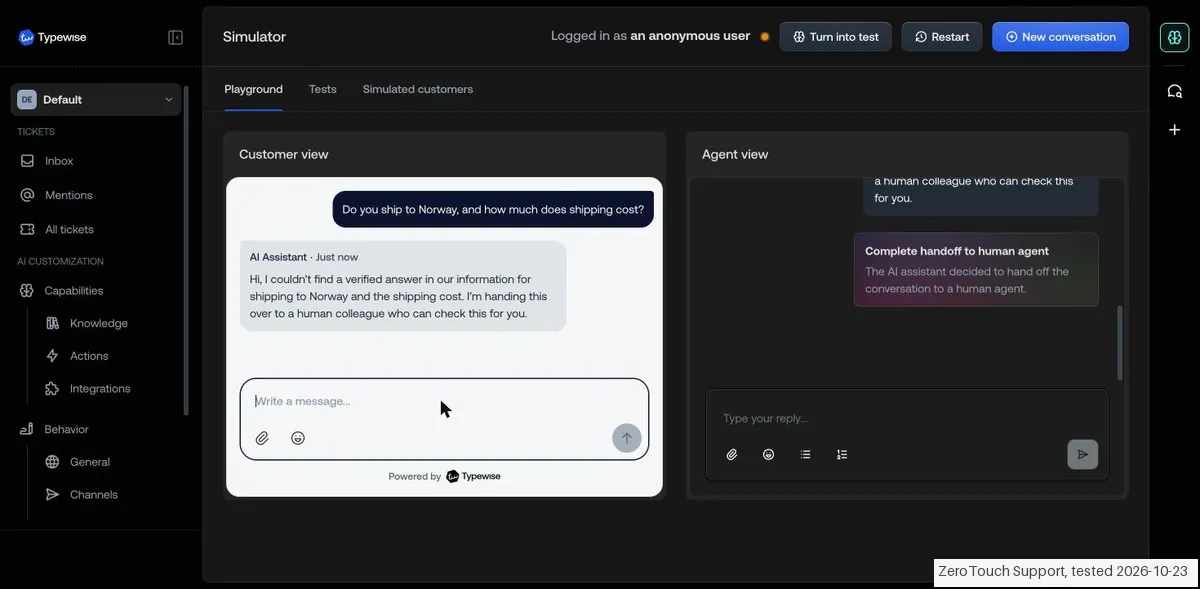
- Once the knowledge source was ready, the answers matched it: an unopened vase after 5 days got 'yes, you can return it' citing the 14-day policy for unopened items, and an opened lamp got 'not eligible for return or refund'. Asked about shipping to Norway, which the source did not cover, it said it couldn't find a verified answer and handed the conversation to a human ('Needs agent takeover'). It did not make anything up.
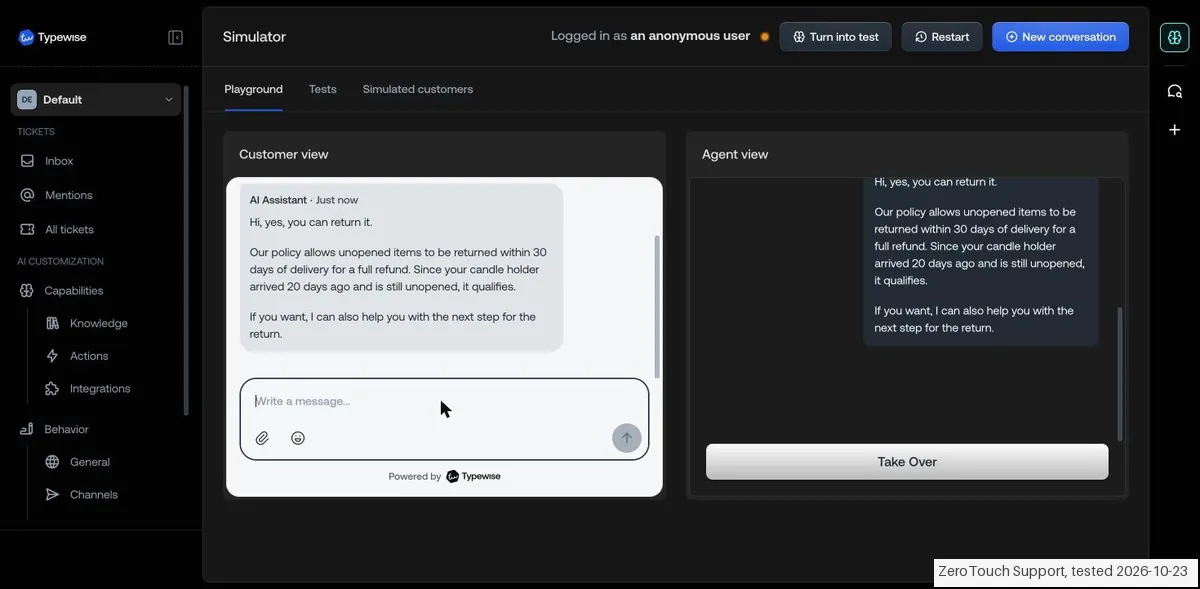
- Changing the rule from 14 to 30 days took effect in the Simulator straight away: an unopened candle holder after 20 days first got 'no ... outside our return window' and, after the change, 'yes ... within 30 days of delivery for a full refund'. The source showed 'Not published yet', so this was the unpublished version.
- Our very first question, asked while the knowledge source still said 'Analyzing' (it turned 'Ready' after about a minute), was handed over to a human in full. Asked again once the source was ready, it was answered.
Pricing (2026)
✓ Pricing re-verified 27 Sep 2026
| Plan | Price | What you get |
|---|---|---|
| Starter | $99 a month or $999 a year | 1 user, email and chat, $20 monthly AI Operator budget, pay-as-you-go resolutions at $2 each |
| Growth | $599 a month or $5,999 a year | 5 users, all digital channels, $100 AI Operator budget, volume packages bring resolutions down to $1 |
| Business | $2,000 a month billed annually | 5 users, 3 workspaces (multi-brand), $500 AI Operator budget, two custom integration days a year, success consultant |
| Enterprise | no published price | SSO, custom DPA, unlimited workspaces, $1,500 AI Operator budget, five integration days |
Summarised from the pricing notes below; the notes carry the conditions.
A base plan plus a per-resolution rate. Starter is $99 a month or $999 a year with 1 user, email and chat, a $20 monthly AI Operator budget and pay-as-you-go resolutions at $2 each. Growth is $599 a month or $5,999 a year with 5 users, all digital channels, a $100 AI Operator budget and volume packages that bring resolutions down to $1.
Business is $2,000 a month billed annually with 5 users, 3 workspaces (multi-brand), a $500 AI Operator budget, two custom integration days a year and a success consultant. Enterprise is quoted and adds SSO, a custom DPA, unlimited workspaces, a $1,500 AI Operator budget and five integration days. Additional users are $89 a month on every plan - an add-on, not a starting price.
Full pricing notes (2 more paragraphs)
Every plan starts with a 14-day trial of 100 resolution credits and $10 of AI Operator credit, no card. The page defines the meter: a full resolution counts once, a hand-off to a person counts as half, and unresolved or flagged tickets are free. Prices are in USD and shown in EUR, GBP or CHF at parity depending on your location. Correction 23 Sep 2026: our 5 Sep reading put unlimited workspaces and the $1,500 budget on Business; on the current page those belong to Enterprise.
History: in August 2026 the only published number was 'starting from $1 per resolution' on the home page and /pricing returned a 404.
Plans change — always verify the live price on their site.
Category context: Customer Support. Across the 14 tools in this category that we researched with a public US-dollar price, the median entry price is about $20 a month (lowest paid plan as listed, per seat where the vendor prices per seat). Typewise’s entry price of $99 a month sits above that median. Compare pricing conditions in the Software Cost Atlas →
What the pricing page doesn’t say
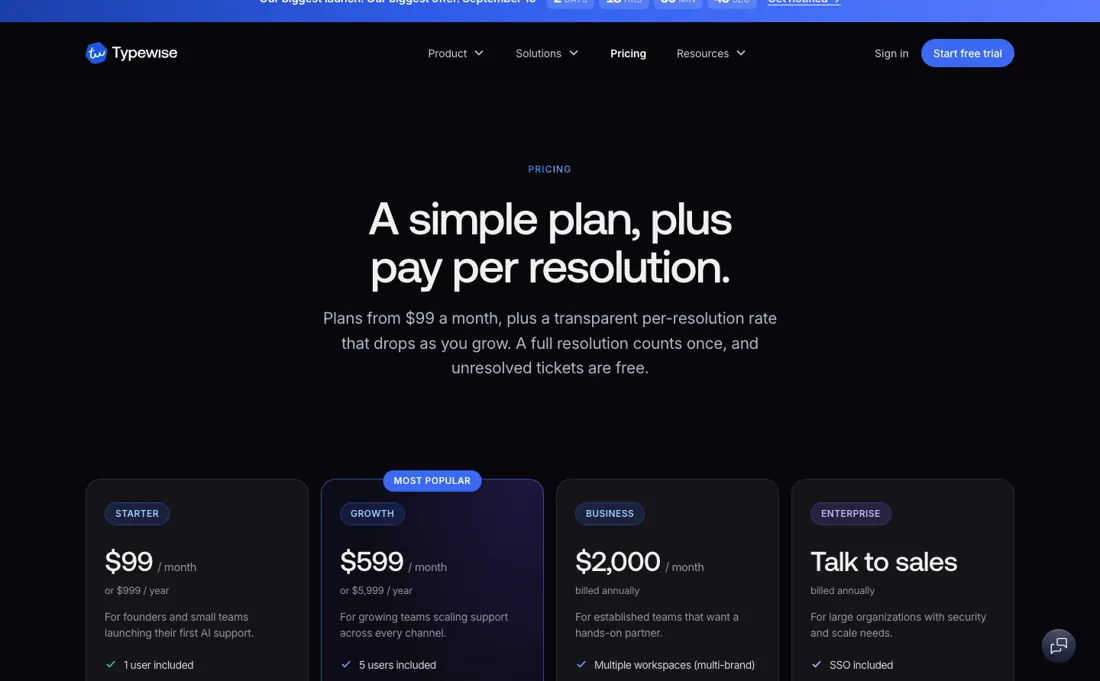
The meter is published too — a ticket closed end to end counts as one resolution, a hand-off to a person counts as half, and a ticket passed straight through or flagged is free. So a conversation the AI cannot finish still bills, at half rate, which is fair but worth budgeting for. What the page still does not say is whether a reopened ticket counts again; get that in writing before the trial.
The ROI calculator on their site is the vendor's own arithmetic; the pilot is where you replace it with yours.
Watch the video review
The video version of this review, from our YouTube channel.
⚡ Short on time? Watch the 30-second verdict Short.
What Typewise does
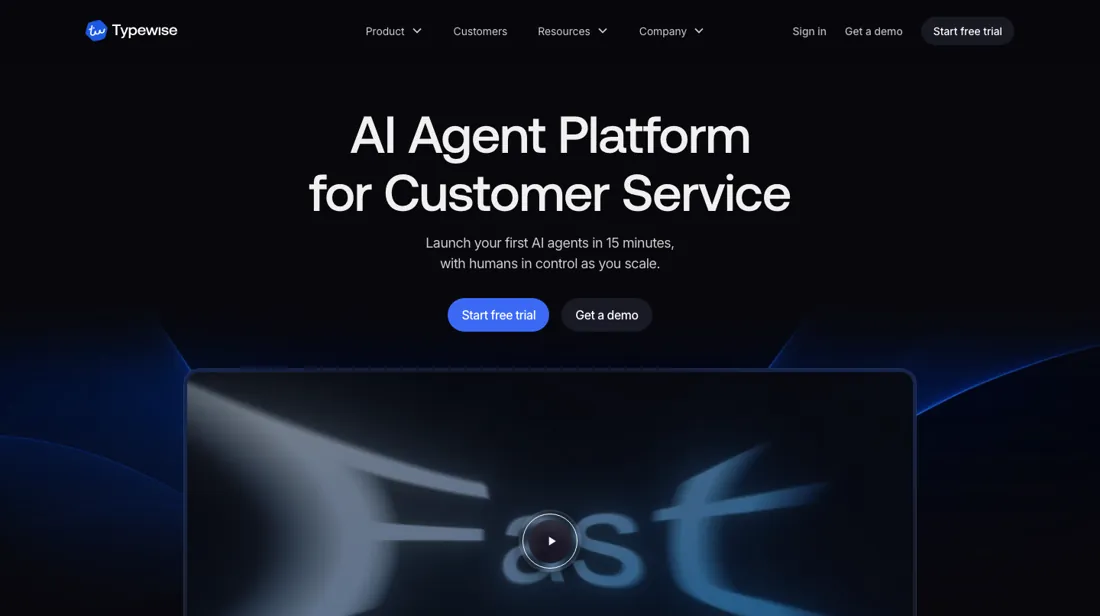
AI agents for customer service that resolve requests end to end and take action in the systems you already run - CRM, ERP, billing, commerce - configured in plain language.
What buyers report about Typewise
Hands-on: tested 2026-10-23Documented by the vendor: 4 features, read 2026-10-07Reported by buyers: OMR Reviews and practitioner reviews, read August 2026
Themes from the buyer-review sites listed at the foot of this page, read in August 2026. We tested Typewise ourselves on 2026-10-23, but one test is a narrow sample, so here is what other buyers report. We summarise it here because the complaints are usually the part a vendor page leaves out.
- • Reviewers who do write consistently report real time saved on high-volume written support.
- • GDPR-compliant by design, which for German, Austrian and Swiss teams under additional national rules is a genuine advantage rather than a checkbox.
- • In August 2026 pricing was quote-only behind a sales demo, with 'from around $1 per resolution' as the only figure on the site. That has since changed: Typewise now publishes a plan ladder with a per-resolution rate (see the pricing section above); Enterprise is still quoted.
- • The company is small — around 12 people — with a thin public track record. Weigh that if you are betting a support operation on it.
- • Voice is on the roadmap but not available. If your channel mix includes calls, this covers only part of it.
- • The review base is 15 Trustpilot reviews averaging 2.7 out of 5 (read 24 August 2026). That is far too small a sample for a verdict either way.
A hand-off bills at half
The published ladder (read 5 September 2026) is Starter $99 a month with $2 a resolution, Growth $599 with volume packages down to $1, and Business $2,000 a month billed annually; every plan includes an AI Operator budget ($20 on Starter, $100 on Growth and $500 on Business; the quoted Enterprise plan carries $1,500) and extra users are $89 a month. That replaces the August picture, when 'starting from $1 per resolution' on the home page was the only number and /pricing returned a 404.
Because the bill scales with resolutions rather than seats, the meter matters more than the tier — and the page now publishes it. A ticket the AI closes end to end counts as one resolution; a hand-off to a person counts as half; tickets passed straight to a human or flagged are free. That answers August's open question. A hand-off does bill, so a conversation the AI cannot finish costs you twice: Typewise and the agent who picks it up.
Half is defensible, not a trap, but the tool is not free on the tickets it handles worst. One question stays unpublished: whether a reopened ticket counts again. Ask before the trial. Then price it against the right comparison. Per-resolution pricing is priced against labour, not against other software: on Starter, a team handling 2,000 tickets a month is looking at $99 plus up to $4,000 in resolutions if everything resolves through the platform, which is why Growth's volume packages at $1 exist. Work out your own resolved volume before you pick a tier.
What we found running Typewise ourselves
The first findings are at the top of this page. The rest:
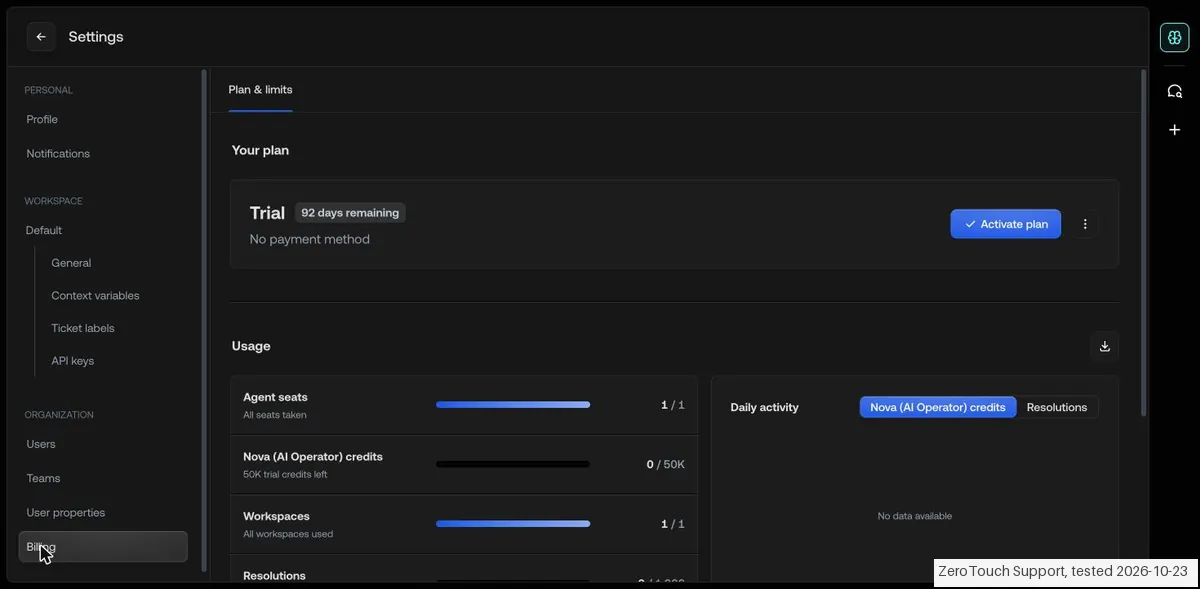
- Plan & limits showed 'Trial · 92 days remaining' on the day of sign-up, against 14 days in Typewise's documentation, with no payment method, 1,000 resolutions, 50K Nova (AI Operator) credits and one agent seat. Simulator conversations did not count as resolutions (still 0 of 1,000).
- Every Simulator conversation became a ticket with an automatic title, priority and status. 'Export all' downloads an Excel file straight away with 16 columns per ticket, including the AI summary, status, language and CSAT, but not the conversation messages themselves.
- Knowledge sources can be a live URL, web search, a website import, a file (PDF, Word or Excel only), text, or 'Ask a team member'. Parts of the interface showed Dutch text next to English, and once text we typed into the description landed in the name field.
Claim vs. what we measured
We set a claim from Typewise's own pages next to what we saw in our test, on the plan named. The status says whether the two describe the same thing and match; it is not a verdict on the product. Confirmations are listed too.
| What the vendor says | What we measured | Status | What it means if you buy |
|---|---|---|---|
| "The trial runs for 14 days"Source: docs.typewise.app, read 23 Oct 2026 | Measured 2026-10-23: On the day of sign-up, Plan & limits showed 'Trial · 92 days remaining' with no payment method.Our test, 23 Oct 2026; Trial, simulator only | ContradictedSame quantity: trial length shown on day one. The app gave more than the documentation says, so the difference is in the buyer's favour. | Our trial was longer than the documentation says; check the counter in your own account rather than the docs. |
Exit test: can you take your data out?
On 23 October 2026, in the trial account from this test, we exported the six tickets created by our Simulator conversations with Typewise's own export and checked what the file contains. We did not re-import it. Test date: 23 Oct 2026. We describe the friction rather than score it; this is one run with synthetic records, not a verdict on Typewise.
| What we checked | What we saw |
|---|---|
| Came along in the export |
|
| Lost in the export |
|
| Export route | All tickets > Export all gives an Excel file straight away. |
| Export format | XLSX with one row per ticket and a summary; no conversation text. |
| Re-importing the export | Not tested. |
| Cancelling | Not done; 'Terminate account' sits in the menu next to the plan. |
What the exit test does not show:
- Exporting knowledge sources and settings
- A PDF per ticket
- Re-importing the export
Mail in the first 14 days
Measurement running until 2026-11-05T23:00:00Z (last observed 2026-10-27T02:18:01.949814Z).
3 emails in the 14-day window so far; first email after signup: unknown (exact signup time not recorded); 0 with an explicit offer.
Retained inbox and junk only; removed or archived mail is outside this observation. Ambiguous supplier attribution is excluded. Day numbers use elapsed 24-hour periods since the recorded signup date at midnight Europe/Amsterdam; the signup hour is unknown. Offer flags quote literal subject/body text. Replies in our own correspondence (support tickets, our comment requests) are excluded; one-time codes, our own address, our account name and our name are replaced in brackets.
| Day | Time (UTC) | Sender | Literal subject | Folder | Offer evidence |
|---|---|---|---|---|---|
| Day 0 | 2026-10-23 20:09:47 UTC | Typewise team / mail.typewise.app | Your login link for Typewise | inbox | |
| Day 0 | 2026-10-23 20:10:23 UTC | Typewise team / mail.typewise.app | Your Typewise authentication link | inbox | |
| Day 3 | 2026-10-26 08:41:48 UTC | Typewise team / typewise.app | Your Typewise review | inbox |
Screenshots from our test (click to enlarge)
What this test does not show:
- A real channel (chat widget, email, WhatsApp) and publishing
- Specialists, Actions and integrations
- What happens after the trial and what 'Activate plan' costs
- Use of Nova credits
Most of our reviews are researched rather than run — how we review explains which is which, and why we do not pretend otherwise.
How to actually use Typewise
Read the resolution meter on the pricing page before the demo: it is published now, and it is where your bill comes from. One unit when the AI closes a ticket end to end, half when it hands off, nothing when it passes straight through or is flagged. That leaves two things to settle in writing: whether a reopened ticket counts again, which the page does not say, and your rate at your volume, since $1 is a floor rather than the standard rate.
Work out your own cost per ticket before the demo. Take your support team's fully-loaded cost and divide by tickets closed; that figure, not a software comparison, is what per-resolution pricing has to beat. It also gives you something concrete to negotiate with. Then run the pilot on your real mix rather than your simple tickets. Measure two things: what share of conversations the AI closed without a human, and what each handover did to the invoice.
The vendor's ROI calculator is their arithmetic on their assumptions — the pilot exists to replace it with yours.
Where this section comes from: our research notes (208 words)
www.typewise.app/pricing read on 10 September 2026 — the three plan cards (Starter, Growth, Business) with their monthly and annual rates and AI Operator budgets, the comparison table, and the FAQ entries 'What counts as a resolution?', 'Do I pay per seat or per agent?' and 'What are the actual per-resolution rates?', which together define the meter (full resolution 1.0, partial hand-off 0.5, unresolved and flagged free) that the August reading found unpublished.
Re-read 27 September 2026 by plain fetch: www.typewise.app/pricing (all plan amounts, budgets, the $89 extra user, the 14-day trial with 100 resolution credits and $10 AI Operator credit, and the resolution meter unchanged; FAQ 'What happens if I go over my volume?': nothing breaks, you keep paying per resolution and higher volumes move into prepaid packages down to $1.00), www.typewise.app/startups (any code starts the trial; a matching accelerator or VC partner code plus eligibility - under 5 years old, under $2M revenue, under $10M raised, fewer than 50 employees, independent - adds 1,000 resolutions and 3 months free, reviewed in one to two weeks; no testimonial required) and www.typewise.app/compare/zendesk-ai-alternative (Typewise runs on top of Zendesk as the system of record; EU hosting with zero data retention for AI processing). www.typewise.app/llms.txt was read for the page list.
The natural comparison is Intercom Fin or your helpdesk's native AI — the honest comparison is where the work happens: Fin lives inside Intercom's own desk, while Typewise sells itself as a layer above the stack you already run, reading and writing in CRM, ERP and commerce systems. Already on Intercom? The native option starts ahead. Support work spread across several systems? That layer is the argument — ask both what counts as a resolution before you compare the price.
Frequently asked questions
Can you export your data from Typewise?
Exit check 2026-10-23; route excerpt: All tickets > Export all gives an Excel file straight away; came along (excerpts): One row per ticket (6 rows, 16 columns): ticket ID, title, AI summary, customer name and email, channel, priority, …; lost (excerpts): The full conversation messages: the export has only the summary per ticket / The knowledge sources and settings; re-import: not tested.
What happens if my ticket volume goes over what I planned for?
Nothing stops. The pricing FAQ (read 27 September 2026) says you keep paying per resolution at your plan's rate, $2.00 pay as you go on Starter, and higher volumes move you into prepaid packages that bring it down to $1.00. Only full resolutions count as one; a hand-off to a person counts as half, and tickets passed straight to a human or flagged are free, so a busy month costs more only where the AI actually closed tickets.
Does Typewise have a startup deal?
Yes, through partner accelerators and VCs. The startup page (read 27 September 2026) says any code starts the free trial, and if it matches a partner and the company is under 5 years old, under $2M revenue, under $10M raised, under 50 employees and independent, Typewise adds 1,000 resolutions and 3 months free after a review of one to two weeks. Without a partner code you get the standard 14-day trial of 100 resolution credits.
Do I have to leave Zendesk to use Typewise?
No. Typewise's own Zendesk comparison (read 27 September 2026) recommends keeping Zendesk as the system of record and running Typewise on top of it, so nothing is migrated and it can be removed again. You would then pay Zendesk's seats plus Typewise's base plan from $99 a month and its resolution fees. The same page says Typewise hosts in the EU with zero data retention for AI processing.
Is this a hands-on review of Typewise?
Yes. We tested Typewise ourselves on 2026-10-23; the section above says what we tested, what we found and what we did not test, and where a figure comes from the vendor's own documentation instead. Most of our reviews are researched rather than run; we say which is which. We name what each tool is good and bad at, and we earn a commission only if you sign up, at no cost to you.
- Buyer reviews on OMR Reviews and practitioner reviews, read August 2026.
- Re-read 2026-09-23 and again, unchanged, 2026-09-27 on typewise.app/pricing.
- A dated screenshot of that pricing page, kept on this site as the receipt.
- Our own hands-on session with Typewise (2026-10-23), written up in full further down this page.
Others in this category
Reviewed customer support tools that share ground with Typewise — comparable in what they do, not drop-in swaps:
Also in customer support, for browsing rather than as an alternative:
New reviews, price changes we recorded, and the cost conditions we found. No sponsored placements. Unsubscribe anytime.
This is our researched assessment — not a paid placement. The “Visit” links on this page are affiliate links: we may earn a commission if you sign up, at no extra cost to you, and it never changes our take. How we review →