Chatwith Review (2026)AI Agent From $9, Priced in Credits
 By Daan Haket · Tested hands-on · written with an AI assistant · who does what
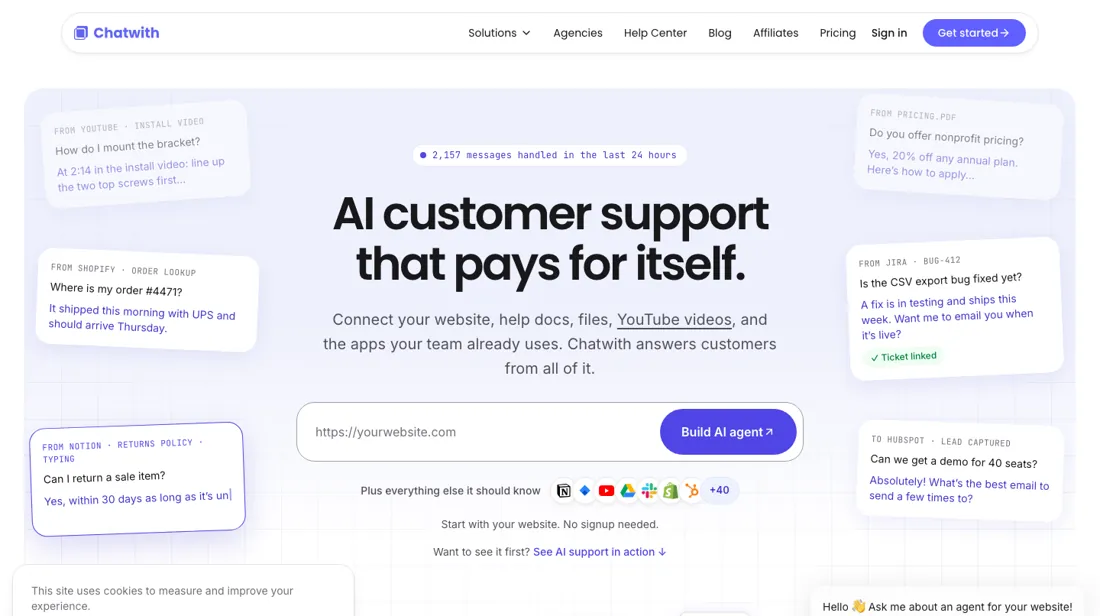
The real price depends on credits, and the conversation estimates assume five replies at one credit each, which the page itself says varies with the model and conversation length.
- Best for Small businesses with repeat customer questions
- Not for support teams that need ticketing
From $9 · per month (250 message credits) · read 2026-11-16
Try Chatwith →Affiliate link: we may earn a commission if you sign up, at no extra cost to you. It never changes our verdict.
Is Chatwith right for you?
Your pain“Customers ask the same questions all day and my team answers each one by hand.”
Does Chatwith solve it?YesOur test (21 Oct 2026): it answered nine of ten questions correctly from 177 characters of text, but contradicted itself once on a warranty question.
Your planHobby, $19 a month. Trial free with a verified work email, $5 upfront with a personal one. Starter shows no trial.
Your pain“One busy week could use up my message credits, and fees can't be refunded.”
Does Chatwith solve it?PartlyPricing page, read 13 Oct 2026: a conversation is estimated at five replies, one credit each, and the terms call fees non-refundable.
Your planHobby on monthly billing, plus $9 per 1,000 extra credits
- Support teams that need ticketing. Pricing page and terms, read 13 Oct 2026: it is an answer bot, with no ticketing or team inbox, and the two cheapest plans have community support only. Better fit: Help Scout.
The “Try” buttons are affiliate links: we may earn a commission if you sign up, at no extra cost to you, and it never changes our verdict.
BLACKFRIDAY2026, 20% off one annual term of any Chatwith planCompare in the AtlasSee our test ↓Transparency: the “Visit” links on this page are affiliate links: we may earn a commission if you sign up, at no extra cost to you. No vendor can pay for a better review or verdict. How we make money →
No notices on Chatwith’s status page in the last 90 days
Across the 37 vendor status pages we follow, the median is 3 in the same window.
Counted from the vendor’s own status page feed, read 2026-11-26. These are notices the vendor chose to publish, not measured uptime; they can include maintenance and services beyond this product.
Tested by our team on 21 October 2026 on a new account, without connecting a website or paying: we created the account and our AI assistant ran the test in our browser. We trained the agent on 177 characters of text about a made-up shop (the same facts as in our Tidio test), then asked five fact questions, five rephrased ones and two it could not know. Tested plan and message allowance: not established; we did not reach the dashboard.
How we tested
- Completed chatbot onboarding and trained on our supplied knowledge
- Opened the test chat and inspected its guardrails
- Asked five factual questions and five paraphrases in the chat
- Asked questions outside the chatbot knowledge
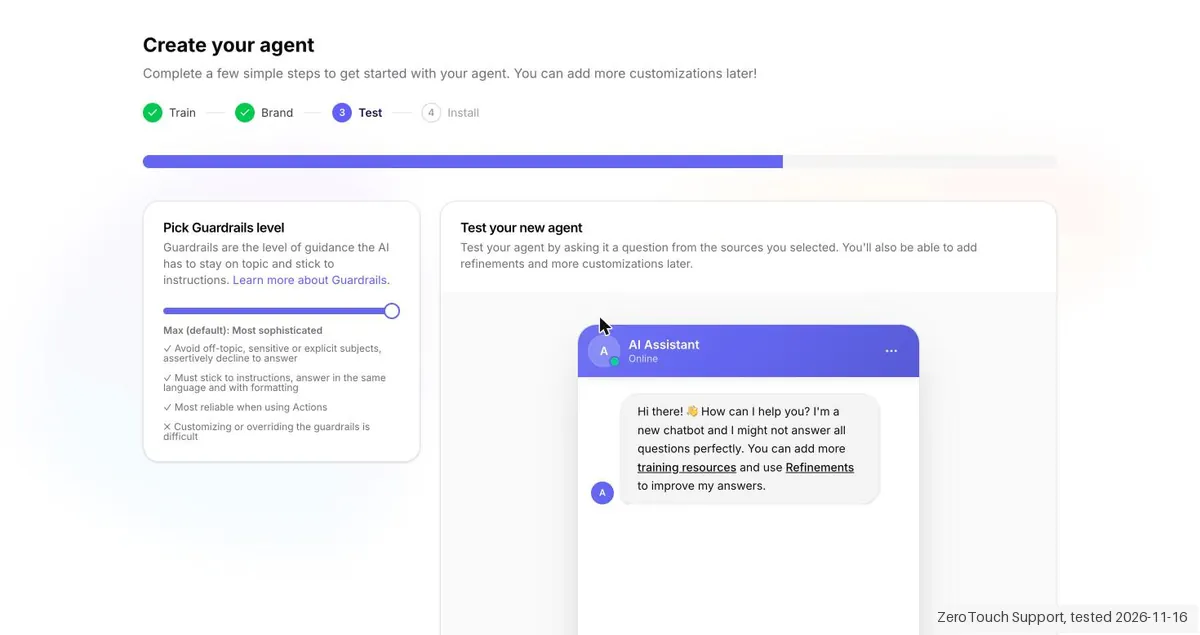
- Onboarding has four steps: Train, Brand, Test and Install. Training sources are a website (with linked pages on the same domain, or a sitemap), files, text or YouTube, against a counter of '0 / 500K characters'. Our 177 characters of text were trained in about 10 to 20 seconds.
- The dashboard only opens after the onboarding: going to the app sent us back to the get-started steps. The first sign-in magic link returned 'INVALID_TOKEN'; a second one worked.
- The guardrails slider starts on 'Max (default): Most sophisticated', which refuses off-topic questions and answers in the user's language; Chatwith warns that 'customizing or overriding the guardrails is difficult'.
Pricing (2026)
✓ Pricing re-verified 16 Nov 2026
Four plans in US dollars, excluding taxes, with annual billing at ten times the monthly price. Starter is $9 a month or $90 a year: 250 message credits a month, about 50 conversations by the page's estimate, 1 agent and 2 million training characters. Hobby is $19 a month or $190 a year with a 7-day trial: free with a verified work email or $5 upfront with a personal email.
The Hobby plan includes 1,000 credits, about 200 conversations, 1 agent and 10 million characters. Standard is $99 a month or $990 a year with a trial: 10,000 credits, about 2,000 conversations, 3 agents and 20 million characters. Business is $399 a month or $3,990 a year with a trial: 40,000 credits, about 8,000 conversations, 5 agents and 50 million characters. Sources are unlimited on every plan, and MCP action calls are allowed at 250, 1,250 and 5,000 a month on the plans that include them.
Full pricing notes (2 more paragraphs)
On both plans, the 7-day trial includes 100 message credits and 1 agent. The 7-day trial is free with a verified work email or costs $5 upfront with a personal email. The conversation estimates assume five AI replies per conversation at one credit per reply, and the page says actual use varies by model and conversation length. Add-ons are $9 a month per 1,000 extra credits, $9 per 10 million training characters, $9 per extra agent and $6 per 1,000 MCP actions.
Support is community on Starter and Hobby, standard on Standard and premium on Business. The terms say fees are non-refundable and payment obligations non-cancellable except as the agreement states, you can stop renewal in your account settings and keep access to the end of the period, and the agreement falls under German law with courts in Berlin.
Plans change, so check the live price on their site before you buy.
Category context: Customer Support. Across the 17 tools in this category that we researched with a public US-dollar price, the median entry price is $20 a month (lowest paid plan as listed, per seat where the vendor prices per seat). Chatwith’s entry price of $9 a month sits below that median. Compare pricing conditions in the Software Cost Atlas →
BLACKFRIDAY2026, 20% off one annual term of any Chatwith plan with the code BLACKFRIDAY2026 at checkout. Chatwith announced it to its own mailing list on 4 November 2026, open to new and existing customers, and it must be entered by 30 November 2026, 11:59 PM ET. Read the shape of it before you count on it: it covers annual plans only (monthly plans are excluded), it applies to one annual term and the subscription then renews at the standard annual rate, and annual fees are non-refundable under Chatwith's terms. It is Chatwith's own offer, not a code made for our readers, and we have not run it through the checkout ourselves.Vendor-confirmed: Received from Chatwith by email, 4 Nov 2026. Not tested by us at a checkout. Ends 30 Nov 2026, 23:59 EST (04:59 UTC, 05:59 Amsterdam).
What the pricing page doesn’t say
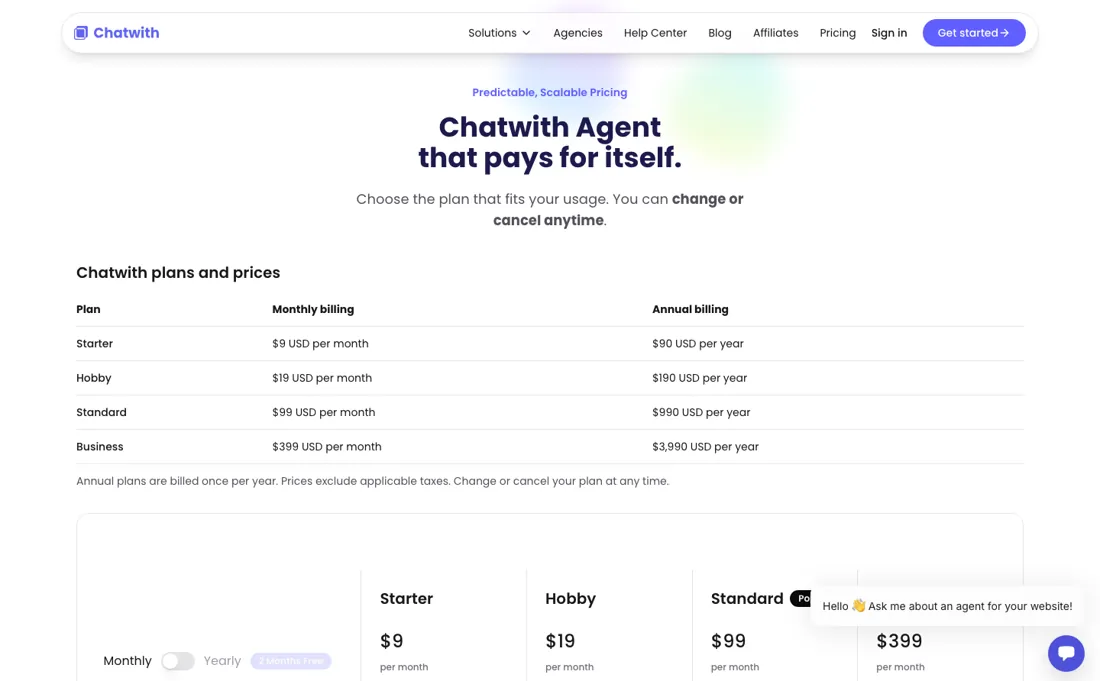
Fees are non-refundable under the terms, and Starter shows no trial. The gap between Hobby at $19 and Standard at $99 is steep, so small sites may end up buying credit add-ons. Support on the two cheapest plans is community only. The agreement falls under German law. The testimonials and time-saved figures on the site are Chatwith's own. In our own test on 21 October 2026 it answered nine of ten questions correctly from 177 characters of training text and said 'I do not know' to one it could not know, but contradicted itself once ('No. ... so it is still covered') and left our last question at 'Not sent'.
Watch the video review
The video version of this review, from our YouTube channel.
What Chatwith does
No-code AI agent builder that trains a support chatbot on your website, docs, files and connected apps, answers customers on your site, WhatsApp, Instagram, Messenger, Slack or Telegram, collects leads and escalates to a person; priced by message credits.
Price the conversations, not the plan
The plans are mostly the same product with more usage. What you are buying is message credits: one credit per AI reply on the default assumption, so Starter's 250 credits are about 50 conversations of five replies, Hobby's 1,000 about 200, Standard's 10,000 about 2,000. Better models and longer chats use more, the page warns. The jump from Hobby at $19 to Standard at $99 is steep, five times the price for ten times the credits plus two more agents.
Before you take it, price the add-on: extra credits are $9 per 1,000 a month, so Hobby plus 2,000 extra credits is $37 for 3,000 credits, our arithmetic, against $99 for 10,000 on Standard. Standard wins once you need more than about 9,000 credits a month or more than one agent. Business at $399 is for volume and several brands: 40,000 credits, 5 agents and premium support. Annual billing gives two months free on every plan, but the terms make fees non-refundable, so pay yearly only once you know your monthly conversation count.
What we found running Chatwith ourselves
The first findings are at the top of this page. The rest:
- All five fact questions were answered correctly, and four of the five rephrased ones, such as 'No. The Lila-17 is purple.' when we asked whether it was red.
- Asked whether a fault after one month was covered by the 37-day warranty, it answered 'No. The Lila-17 warranty is 37 days, so it is still covered after one month.': it starts with no and ends with yes.
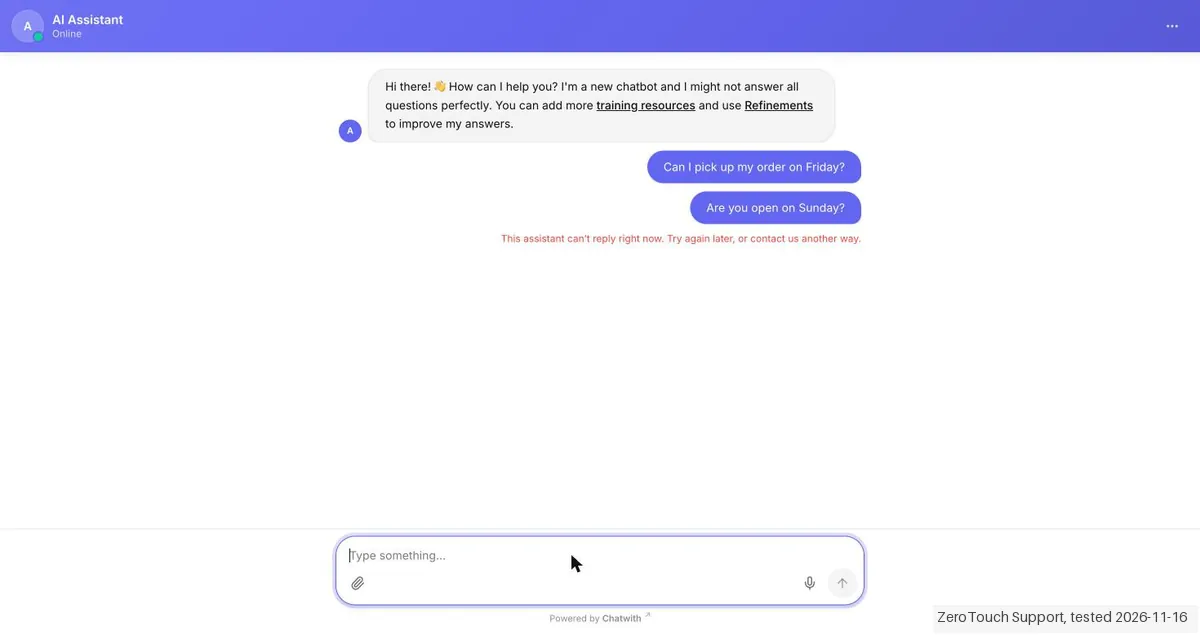
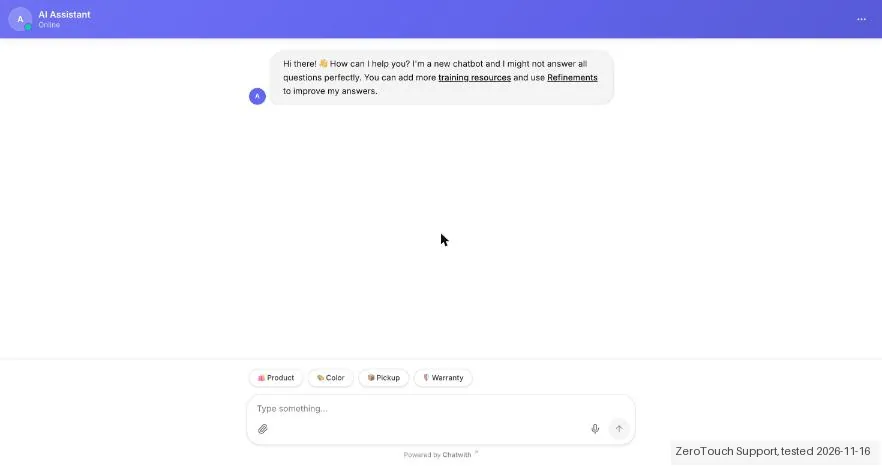
- Asked about Sunday opening, which our text did not cover, it said 'I do not know the answer to this question.' and made nothing up. Our last question, on return costs, stayed at 'Not sent. Retry', also after a retry; we did not find out why.
- The test chat made suggestion buttons from the knowledge itself (Product, Color, Pickup, Warranty) and shows 'Powered by Chatwith'.
- On 16 November 2026, 26 days after the test, the same agent on our unpaid account answered two questions only with 'This assistant can't reply right now.' That day the pricing page listed no free plan: the cheapest plan was Starter at $9 a month.
Mail in the first 14 days
10 emails in the 14-day window; first email after signup: unknown (exact signup time not recorded); 0 with an explicit offer.
Retained inbox and junk only; removed or archived mail is outside this observation. Ambiguous supplier attribution is excluded. Day numbers use elapsed 24-hour periods since the recorded signup date at midnight Europe/Amsterdam; the signup hour is unknown. Offer flags quote literal subject/body text. Replies in our own correspondence (support tickets, our comment requests) are excluded; one-time codes, our own address, our account name and our name are replaced in brackets.
| Day | Time (UTC) | Sender | Literal subject | Folder | Offer evidence |
|---|---|---|---|---|---|
| Day 0 | 2026-10-21 06:27:33 UTC | Chatwith team / notifications.chatwith.tools | Sign in to Chatwith | inbox | |
| Day 0 | 2026-10-21 06:28:29 UTC | Chatwith team / notifications.chatwith.tools | Sign in to Chatwith | inbox | |
| Day 0 | 2026-10-21 06:29:23 UTC | Chatwith team / notifications.chatwith.tools | Sign in to Chatwith | inbox | |
| Day 0 | 2026-10-21 06:31:15 UTC | Chatwith team / notifications.chatwith.tools | Sign in to Chatwith | inbox | |
| Day 1 | 2026-10-22 00:51:16 UTC | Chatwith team / update.chatwith.tools | Welcome to Chatwith 👋 | inbox | |
| Day 3 | 2026-10-24 00:51:21 UTC | Chatwith team / update.chatwith.tools | This is how to create your first chatbot using files or website | inbox | |
| Day 5 | 2026-10-26 00:51:24 UTC | Chatwith team / update.chatwith.tools | Need a hand? | inbox | |
| Day 8 | 2026-10-29 13:51:28 UTC | Chatwith team / update.chatwith.tools | New in Chatwith: Instagram, Messenger, and a much easier WhatsApp | inbox | |
| Day 10 | 2026-10-31 00:51:44 UTC | Chatwith team / update.chatwith.tools | Bespoke solutions: 👍 | inbox | |
| Day 10 | 2026-10-31 00:51:57 UTC | Chatwith team / update.chatwith.tools | Actionable tips for using AI in business | inbox |
Screenshots from our test (click to enlarge)
What this test does not show:
- The plan, message credits and credits used per question (we did not open the dashboard)
- Why the last question was not sent
- Choosing another model, switching knowledge off, and Refinements
- Installing the widget on a site, and Actions
- Website and file sources
Most of our reviews are researched rather than run. How we review explains which is which, and why we do not pretend otherwise.
How to actually use Chatwith
Start on Hobby's 7-day trial, which includes 100 message credits and 1 agent. It costs nothing with a verified work email and $5 upfront if you sign up with a personal address. Starter shows no trial on the pricing page. Train the agent on your help centre, product docs and the files support uses most, then ask it the twenty questions your team answers every week and check each answer against your own policy.
If your plan includes them, set up human escalation and lead collection before going live, and watch the analytics for the first week: the number of AI replies per conversation tells you how far your credits will go, which is the real price of this product. Install the widget through the guides for WordPress, Shopify, Webflow, Wix or Framer, or connect WhatsApp, Slack or Telegram. Fees are non-refundable once paid, so stay on monthly billing until a month of real traffic shows which plan you need.
In our test on 21 October 2026 the setup ran in four steps (Train, Brand, Test, Install) and the dashboard stayed closed until they were done. Guardrails start on 'Max', which refuses off-topic questions and which Chatwith says is difficult to override. Include questions that need a yes or no with a reason: that is where our test agent contradicted itself.
Where this section comes from: our research notes (156 words)
Chatwith's own pages, read in a live browser on 13 October 2026: the pricing page at chatwith.tools/pricing (plan prices monthly and annually, message credits, conversation estimates and their footnote, training characters, agents, MCP action allowances, add-on prices, support levels, trial labels) and the terms of use at chatwith.tools/terms (non-refundable fees, cancellation and access to the end of the period, German law and Berlin courts), plus the home page (sources, integrations, use cases).
The feature table's check marks did not render as text in our browser, so per-plan features other than the numbers are not claimed here. Customer quotes and the hours-saved claims on Chatwith's home page are the vendor's marketing and are not used as evidence. Chatwith is an affiliate partner of ours through Lemon Squeezy. Our team also tested Chatwith on 21 October 2026; the findings are further down this page. For the MCP-action question: the add-ons section on chatwith.tools/pricing, read on 24 October 2026.
Chatwith vs Tidio, side by side
Each column shows the vendor’s own published entry price, read on the date shown. Entry prices can cover different services or units, so check what each one buys. We do not average them into a score.
Both names above are affiliate links: we may earn a commission if you sign up, at no extra cost to you. Neither changes what this table says.
The natural comparison is Tidio: Tidio is in our research too, re-verified on 10 October 2026: Starter $29 a month paid monthly for 100 billable conversations and 10 seats, with its Lyro AI agent metered separately on top. Chatwith, read on 13 October 2026, starts at $9 a month for 250 message credits, about 50 AI conversations by its own estimate, and $19 for 1,000. Chatwith is the cheaper way to put an AI answer bot on a site; Tidio is the fuller live-chat and help-desk suite where people answer alongside the AI. With the same five facts in our own tests on 21 October 2026, Tidio's Lyro answered ten of ten questions correctly and Chatwith nine of ten.
Not a fit for you?
Chatwith is not for you if you need a full help desk with ticketing and a team inbox rather than an answer bot, your traffic is unpredictable and you want a refund route, or you need phone support on a small plan. In that case, look at Tidio, built for support teams that want an AI agent and a help desk from one vendor and can size the shared conversation quota against their own volume, and Shopify, WordPress or Wix stores that want free live chat and treat the 50 free Lyro conversations as a test of whether the AI answers their questions.
The Visit link is an affiliate link: we may earn a commission, at no extra cost to you. We picked this alternative for fit first; commission only decides between equal fits.
Frequently asked questions
Is there a free plan?
No. Chatwith's pricing page, read on 24 November 2026, lists four paid plans in US dollars: Starter at $9 a month or $90 a year, Hobby $19, Standard $99 and Business $399, with a 7-day trial on Hobby, Standard and Business only (free with a verified work email or $5 upfront with a personal email). Our unpaid test account from October could no longer get answers from its agent on 16 November 2026.
How many conversations does a Chatwith plan cover?
The pricing page, read 13 October 2026, estimates about 50 a month on Starter (250 credits), 200 on Hobby (1,000), 2,000 on Standard (10,000) and 8,000 on Business (40,000), assuming five AI replies per conversation at one credit each. It notes that actual use varies by model and conversation length.
Can I get a refund from Chatwith?
The terms of use, read 13 October 2026, say fees are non-refundable and payment obligations non-cancellable, except where the agreement says otherwise, such as an uncured breach by Chatwith. You can stop renewal in your account settings and keep access until the end of the period.
Is there a free trial?
Hobby, Standard and Business offer a 7-day trial with 100 message credits and 1 agent. With a verified work email the trial is free; with a personal email it costs $5 upfront. Starter shows no trial. Read 24 November 2026.
Do all agent actions count against the extra MCP-action allowance?
No. The add-ons section of Chatwith's pricing page, read on 24 October 2026, lists Extra MCP Actions at $6 a month per 1,000 MCP action calls and says built-in, custom API and webhook actions do not count. Only calls to MCP tools draw from that allowance; message credits are a separate meter, sold as Extra Messages at $9 a month per 1,000 credits.
Is this a hands-on review of Chatwith?
Yes. We tested Chatwith ourselves on 2026-10-21; the section above says what we tested, what we found and what we did not test, and where a figure comes from the vendor's own documentation instead. Most of our reviews are researched rather than run; we say which is which. We name what each tool is good and bad at, and we earn a commission only if you sign up, at no cost to you.
- Read 2026-11-24 on chatwith.tools/pricing. Terms read 2026-10-13 at chatwith.tools/terms.
- A dated screenshot of that pricing page, kept on this site as the receipt.
- Our own hands-on session with Chatwith (2026-10-21), written up in full further down this page.
Bottom line
In one line: You pay in message credits, roughly five per conversation by the page's own estimate, and the terms make fees non-refundable.
Best for: small businesses with repeat customer questions.
The Try button is an affiliate link; we may earn a commission at no extra cost to you.
Others in this category
Reviewed customer support tools that share ground with Chatwith. They are comparable in what they do, not drop-in swaps:
New reviews, price changes we recorded, and the cost conditions we found. No sponsored placements. Unsubscribe anytime.
This is our researched assessment, not a paid placement. The “Visit” links on this page are affiliate links: we may earn a commission if you sign up, at no extra cost to you, and it never changes our take. How we review →