StoreFAQ Review (2026)Success Costs You Page Views
 By Daan Haket · Researched and written with an AI assistant · who does what
The meter is FAQ page views, and that is the thing this app exists to increase.
small Shopify stores that want SEO-tagged FAQ pages with JSON-LD schema and a light AI chatbot for deflection, without standing up a full support stack.
you have real traffic, because the page-view meter charges you for the FAQ pages doing their job, or you need ticketing, agent workflows and multichannel support reporting.
Transparency: the “Visit” links on this page are affiliate links — we may earn a commission if you sign up, at no extra cost to you. No vendor can pay for a better review or verdict. How we make money →
Pricing (2026)
✓ Pricing re-verified 9 Oct 2026
Four tiers, metered on FAQ page views and AI chatbot conversations rather than on the number of FAQs. Free: 100 FAQ page views, unlimited FAQs and FAQ groups, the AI chatbot and AI-written FAQs, 25 AI conversations for the lifetime of the account, AI training on up to 50 products, export and import, instant answer with live chat and standard support. Professional $7.99 a month: 500 FAQ page views, 50 AI conversations a month, training on 150 products, multilingual FAQs and dedicated support, with overage at $0.0159 per extra page view and $0.30 per extra AI conversation.
Growth $14.99 a month: 2,000 FAQ page views, 100 AI conversations a month, 300 products, with overage at $0.0075 a view and $0.30 a conversation. Enterprise $49.99 a month or $479.90 a year, a 20% saving: unlimited FAQ page views, 500 AI conversations a month, 2,000 products, priority support and $0.30 per extra conversation. All charges are billed in USD and recur every 30 days.
Developer Storeware, 124 Broadkill Rd #599, Milton, Delaware; the app launched 3 January 2024 and carries Shopify's “Built for Shopify” badge. Plans change — always verify the live price on their site.
Category context: Customer Support. Across the 14 tools in this category that we researched with a public US-dollar price, the median entry price is about $20 a month (lowest paid plan as listed, per seat where the vendor prices per seat). StoreFAQ’s entry price of $7.99 a month sits below that median. Compare pricing conditions in the Software Cost Atlas →
What the pricing page doesn’t say
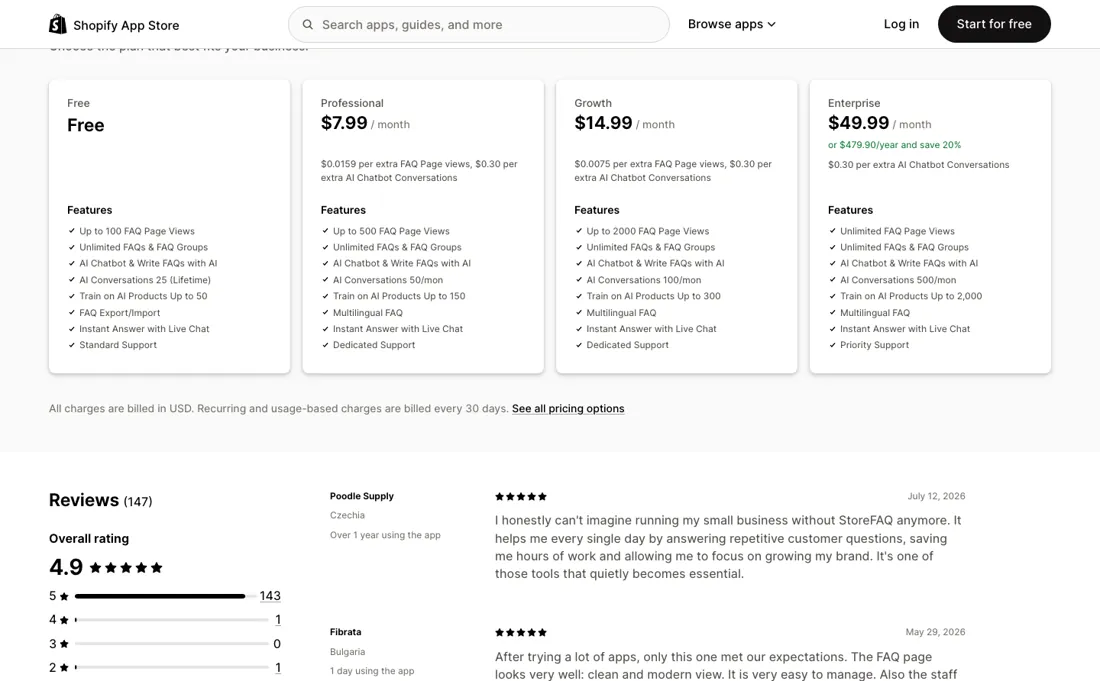
You install it to get SEO-friendly FAQ pages that rank and get read; every read is a billable unit. The free plan stops at 100 views and Professional at 500, which a product-page FAQ on a store with any traffic burns through in days, and then it is $0.0159 a view. Unlimited views arrive only on the $49.99 tier. Success on the cheap plans costs you money, which is an odd shape for a pricing page and the first thing to model before you install.
The AI allowance is the second meter and it is tight. Twenty-five conversations for the entire life of a free account, fifty a month at $7.99, a hundred at $14.99, and $0.30 each after that. Two hundred extra conversations in a month is $60, more than the top tier costs outright, so if the chatbot is the reason you are here, price the conversations rather than the subscription and jump straight to the tier that fits.
And know the boundary of the tool. This builds FAQ content, schema and a light chat layer. It is not a helpdesk: no ticketing, no agent queues, no multichannel reporting. Anything a shopper asks that an FAQ cannot answer still lands in whatever inbox you had before.
Watch the video review
The video version of this review, from our YouTube channel.
What StoreFAQ does
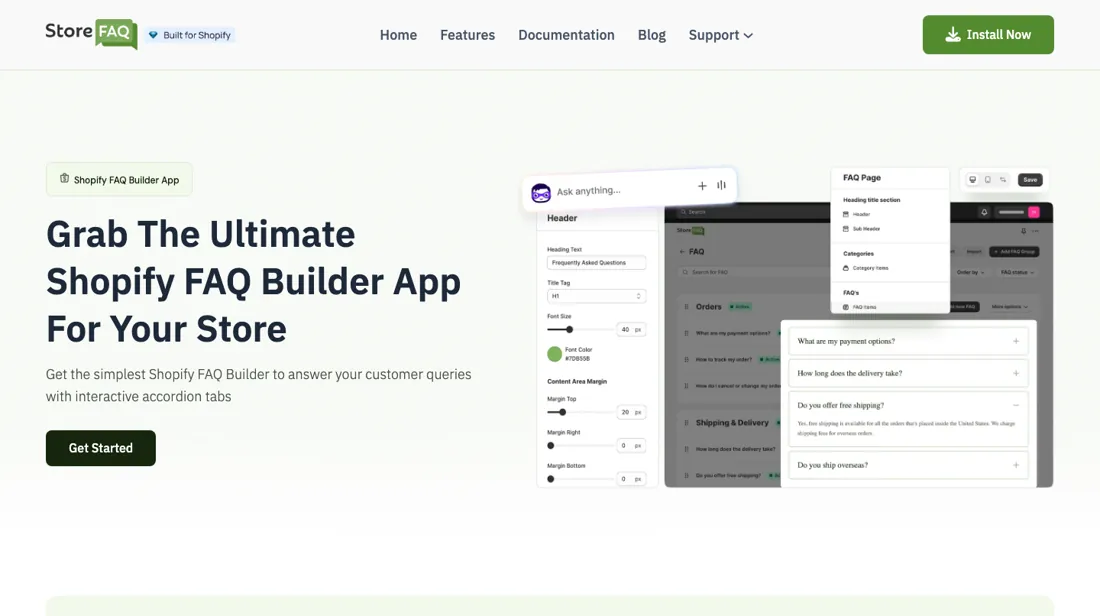
Builds SEO-friendly FAQ pages and product FAQ accordions with JSON-LD schema on Shopify, plus an AI chatbot, instant answers and live chat.
What buyers report about StoreFAQ
Hands-on: not tested by usReported by buyers: Shopify App Store, read August 2026
Themes from the buyer-review sites listed at the foot of this page, read in August 2026. We have not run StoreFAQ ourselves, so this is other buyers' experience rather than ours. We summarise it here because the complaints are usually the part a vendor page leaves out.
- • 4.9 across 147 reviews with 97% at five stars. The two reviews with over a year behind them are the ones worth weighing: Poodle Supply (Czechia, over a year, 12 July 2026) says they can no longer imagine running the shop without it and describes hours saved daily; Cater-ConnectUK Ltd (United Kingdom, over a year, 23 June 2026) notes the product has kept improving and calls support excellent and personable.
- • Support is what most reviewers are actually reviewing, and they name individuals. The Aquabag (United States, about a year, 30 April 2026) had a feature tweak answered the same day and was pointed at functionality that already existed; ecobox.do (Dominican Republic, seven days, 29 May 2026) names Nicole and reports staff going into the store to make the adjustment; Little Keepsake (India, about an hour, 2 July 2026) names Florence. Fibrata (Bulgaria, one day, 29 May 2026) says several alternatives were tried and only this one met expectations.
- • Every substantive negative review on the listing is about the meter, and both use the language of a bait. Comfort Pure (United States, 12 days, 2 September 2025) says the app was presented as free and then restricted to 100 views a month after installation; LAIF (Poland, about a month, 3 September 2025) uses the words deceived and cheated about the same 100-view cap, calling the change unethical. That is two of the three sub-five-star reviews on the listing, and the cap they describe is the free plan as it stands today.
- • The third negative carries no detail: Deck & Rail Supply (United States, about an hour, edited 24 March 2025) posts a headline that the app needs improvement and nothing more. The vendor's public reply attributes it to a technical fault of three to four hours that was fixed, and asks for a reinstall.
Where the ratings disagree. The five-star reviews and the one-star reviews are not about the same product. The praise is overwhelmingly about the support desk and is written early — Topflite NZ at about an hour (6 August 2026), 6 Brothers Services LLC at 26 minutes (4 August 2026), Little Keepsake at about an hour — which is long enough to judge a support chat and far too early to reach a view cap. The complaints come from merchants at 12 days and about a month, and they are all about that cap. Nobody who praises the app has yet hit the thing the complaints are about, so the 4.9 says a lot about the vendor's responsiveness and very little about whether the metered plan holds up on a store with traffic.
Pages read (August 2026): Shopify App Store
Professional is the right plan for 440 views
The meter here is FAQ page views, which is the thing this app exists to increase — so success costs money, and the tiers are worth doing properly (read 2026-08-21 on the Shopify listing). Free covers 100 views. Professional is $7.99 for 500 views with overage at $0.0159 a view. Growth is $14.99 for 2,000 views with overage at $0.0075. Enterprise is $49.99 a month, or $479.90 a year for a 20% saving, with unlimited views.
Put the overage into the comparison and the middle of the ladder collapses. Professional plus overage reaches $14.99 — Growth's price — at just 940 views a month. So Professional is only ever the cheapest plan between 500 and 940 views: a window 440 views wide. Any FAQ page with genuine traffic passes through it in days, and after that you are paying Growth's price for Professional's allowance. Growth holds up much longer.
It stays cheapest until about 6,667 views a month, which is where its overage has added $35 and brought it level with Enterprise's unlimited $49.99. Above that, Enterprise is simply the answer — and 6,667 FAQ page views a month is a modest store, so a shop with real traffic belongs on the $49.99 plan, which is 6.3 times the entry price. That is the honest reading of this pricing page: it is cheap for a store nobody visits.
The AI conversation meter runs the opposite way to the view meter and deserves separate treatment. Conversations cost $0.30 each above your allowance on every tier — there is no volume break at all — while the included rate is $0.16 on Professional, $0.15 on Growth and $0.10 on Enterprise. Overage is therefore two to three times the included price, so on conversations you should always upgrade rather than overrun.
Two hundred extra conversations is $60, more than Enterprise costs outright. And note the free tier's allowance is 25 conversations for the lifetime of the account, not per month — it is a sample, not a plan. Finally, know the boundary. What you are buying is FAQ content, the schema that goes with it and a light chat layer on top. Ticketing, agent queues and multichannel reporting are not part of it, so a question the FAQ cannot answer still ends up in the inbox you were already using.
Questions we are still checking
Facts about StoreFAQ that would change a buying decision, and where we stand on each. An unanswered question does not mean the feature is missing; it means we have not confirmed it yet.
- What counts as one FAQ page view, and what happens on the free plan once 100 are used? Still checking
Applies to: Free (100 views, no overage rate), Professional and Growth (overage per extra view).
Why it matters: page views are the main meter and the only one that grows with success; neither the listing nor the upgrade guide defines a view or says whether FAQs stop displaying at the free cap.
Checked: StoreFAQ Shopify App Store listing (2026-10-09); StoreFAQ docs: How To Upgrade the StoreFAQ Plan? (2026-10-09)
Have a public source that answers one of these? How we review explains how we check and correct.
How to actually use StoreFAQ
Estimate your FAQ page views before you choose, because that is the meter and the tiers are narrower than they look. Professional is only the cheapest plan between 500 and about 940 views a month; above that its $0.0159 overage has already made Growth cheaper. Growth holds to about 6,667 views, and past that Enterprise's unlimited $49.99 wins outright. Count conversations separately, because they behave the other way round. At $0.30 each above allowance on every tier, overage is two to three times the included rate, so on the AI chatbot you should upgrade rather than overrun.
If the chatbot is your reason for installing, pick the tier from the conversation count and let the page views follow. Use the free plan to test quality rather than volume. Its 25 AI conversations are a lifetime allowance, not a monthly one, so spend them on your genuinely awkward questions — a partial refund, a sizing edge case, a delayed order — and read the answers as a customer would.
And set up where a shopper goes when the FAQ cannot help: there is no ticketing here, so that route has to be your own inbox.
Where this section comes from: our research notes (96 words)
The app's Shopify App Store listing, apps.shopify.com/storefaq, read 10 September 2026: the plan cards with their monthly rates ($7.99, $14.99 and $49.99), the annual figure $479.90, the per-unit rates ($0.0075 and $0.0159) and the allowances beside them. Any per-unit total we quote that the listing does not print is our own arithmetic on those published rates. Re-read 9 October 2026: the listing (prices unchanged) and StoreFAQ's docs 'How To Upgrade the StoreFAQ Plan?', 'How to Configure AI Chatbot in Shopify with StoreFAQ?' and 'How To Import And Export FAQs On Your Shopify Store Using StoreFAQ?' (storefaq.io/docs).
Frequently asked questions
Can I take my FAQs with me if I leave?
Yes for the FAQs themselves. StoreFAQ's guide 'How To Import And Export FAQs' (updated 27 July 2024, read 9 October 2026) has an Export button on the FAQs tab that downloads all FAQs as CSV, and the listing (read 9 October 2026) includes export and import on the free plan. Whether AI chatbot conversations can be exported is not documented.
What happens on the free plan after 100 FAQ page views?
Not confirmed. The listing (read 9 October 2026) caps Free at 100 FAQ page views and publishes overage rates only for paid tiers ($0.0159 a view on Professional, $0.0075 on Growth). StoreFAQ's upgrade guide says only that you need to upgrade if you need more than 100 FAQ page views; neither source says whether FAQs stop displaying or what counts as one view.
Is this a hands-on review of StoreFAQ?
This is a researched assessment, not a hands-on test — where we've used a tool ourselves, we say so explicitly. We name what each tool is good and bad at, and we earn a commission only if you sign up, at no cost to you.
- Buyer reviews on Shopify App Store (listed as “StoreFAQ: Product FAQ Chatbot”), read August 2026.
- Read 2026-08-21 and re-verified unchanged 2026-10-09 on apps.shopify.com/storefaq.
- A dated screenshot of that pricing page, kept on this site as the receipt.
Others in this category
Reviewed customer support tools that share ground with StoreFAQ — comparable in what they do, not drop-in swaps:
New reviews, price changes we recorded, and the cost conditions we found. No sponsored placements. Unsubscribe anytime.
This is our researched assessment — not a paid placement. The “Visit” links on this page are affiliate links: we may earn a commission if you sign up, at no extra cost to you, and it never changes our take. How we review →