HelpCenter Review (2026)
 By Daan Haket · Researched and written with an AI assistant · who does what
The free tier is the hook and the FAQ builder is the reason people stay.
small Shopify stores that want ticketing, live chat and a searchable FAQ page from one app rather than bolting three together.
you already run a general helpdesk like Zendesk or Freshdesk for a business wider than the store — this is Shopify-shaped, not company-shaped.
Transparency: the “Visit” links on this page are affiliate links — we may earn a commission if you sign up, at no extra cost to you. No vendor can pay for a better review or verdict. How we make money →
Pricing (2026)
✓ Pricing re-verified 14 Oct 2026
Free to install, and the meter is tickets rather than agents — Basic already gives unlimited support agents, then bills for every ticket over the allowance. Free covers 10 tickets a month and charges $0.25 for each one after that. Basic is $5.99 a month or $59.99 a year, a 17% saving, and covers 50 tickets, then $0.16 each. Standard is $19.99 or $199.99 a year for 300 tickets, then $0.15.
Advanced is $49.99 or $498.96 a year for 1,000 tickets, then $0.10. Every paid tier carries a 14-day free trial and all charges are billed in USD. Which means the headline $5.99 only holds to 50 tickets a month: at 300 tickets Basic works out at $45.99, because the 250 over the allowance add $40 — while Standard includes those same 300 for $19.99.
Price the tier against your own ticket count rather than the entry rate. The App Store lists it as “SB: Helpdesk, Live Chat & FAQs” from Shark Byte, Inc — the product calls itself HelpCenter, so you will see both names. Rating 4.6 from 316 reviews on 14 October 2026. Plans change — always verify the live price on their site.
Category context: Customer Support. Across the 14 tools in this category that we researched with a public US-dollar price, the median entry price is about $20 a month (lowest paid plan as listed, per seat where the vendor prices per seat). Compare pricing conditions in the Software Cost Atlas →
What the pricing page doesn’t say
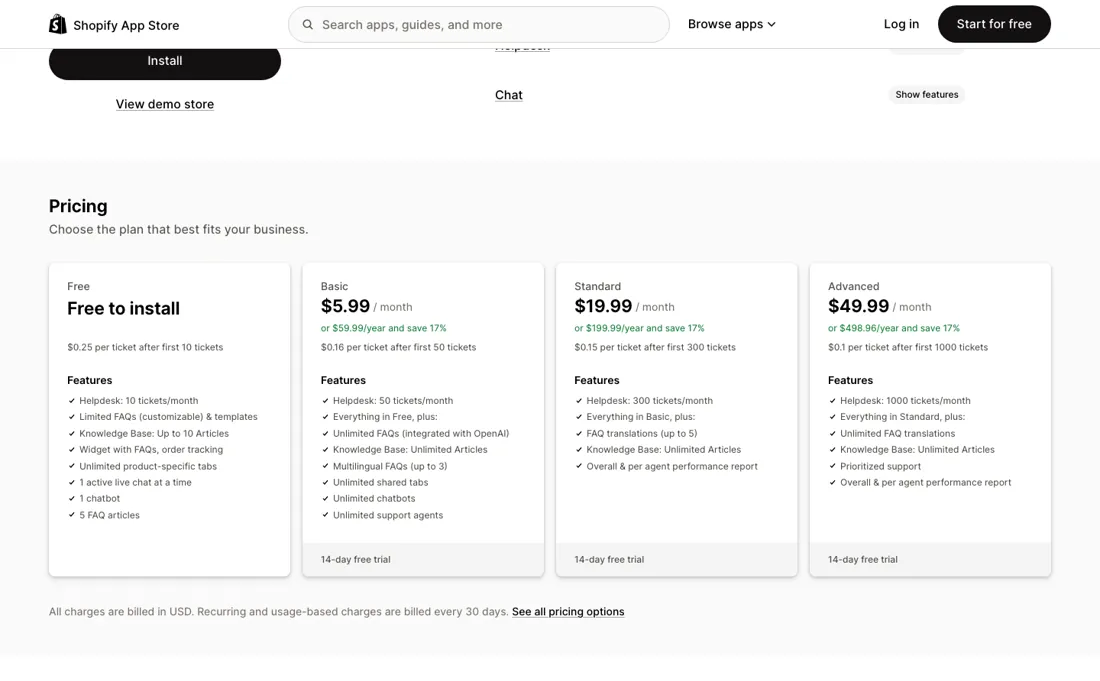
But the meter is tickets, not agents: Basic hands you unlimited support staff and then charges $0.16 for every ticket past fifty. At 300 tickets a month that is $45.99, against $19.99 for the Standard tier that includes them outright — so check your own ticket volume before you treat $5.99 as the price. One dependency worth knowing: translating FAQs into other languages is handed off to a separate app (LangShop), so a multilingual store is two subscriptions, not one.
Watch the video review
The video version of this review, from our YouTube channel.
What HelpCenter does
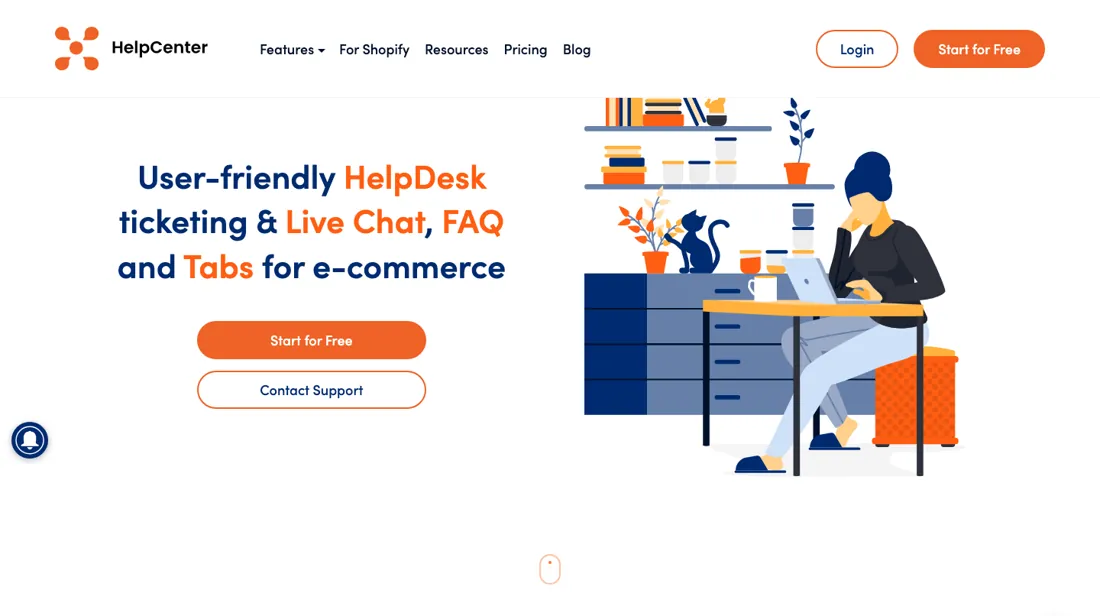
Shopify helpdesk with live chat and an AI FAQ builder: email, chat and Messenger in one ticket queue, plus SEO-friendly FAQ pages.
What buyers report about HelpCenter
Hands-on: not tested by usDocumented by the vendor: 4 features, read 2026-10-08Reported by buyers: the Shopify App Store listing, read 2026-08-29
Themes from the buyer-review sites listed at the foot of this page, read in 2026-08-29. We have not run HelpCenter ourselves, so this is other buyers' experience rather than ours. We summarise it here because the complaints are usually the part a vendor page leaves out.
- • The FAQ builder is what keeps people: reviewers describe running their whole help section on it for four, six, even eight years, with schema markup and deep links to individual questions included.
- • Live-chat support is named repeatedly and by first name. One merchant who had left a one-star review nine years earlier came back in April 2026 to say chat answered in about thirty seconds and fixed the problem inside ten minutes.
- • Reviewers on the ticketing side value assigning customer questions to different agents and answering with saved templates, alongside the FAQ and contact form in the same tool.
- • The 2023 move from free to paid is still the single biggest cluster of one-star reviews. Merchants report their FAQ articles being cut to five on the live storefront — one describes 25 of 30 articles deleted with no way to get them back, another says the content disappeared without notice. The vendor apologised publicly and called the data loss an oversight. If you are on the free tier, treat the article limit as something that touches your live site, not just your admin.
- • A September 2025 permissions update asked for access to customer and order data. A merchant of four years wrote that this is too much for what they use as an FAQ tool and said they were considering migrating; the vendor replied that the scope does not do what the reviewer feared.
- • Contact-form submissions do not become tickets — they are emailed instead, which a June 2025 reviewer calls clunky for a helpdesk.
- • A December 2023 reviewer flags heading structure: categories, sections and articles are three fixed levels, so a store that skips a level ends up with skipped heading levels in the markup. The same reviewer finds the template choice limited.
Where the ratings disagree. The rating is 4.5 across 243 reviews, but the shape matters more than the average: 206 five-stars against nine one-stars, and almost all of those one-stars are dated 2023 and about one event — the pricing change that limited free FAQs. The five-stars are spread across a decade and are mostly about support and the FAQ builder. Read the one-stars as a history of how the vendor handled a plan migration, not as a verdict on the product today.
Pages read (2026-08-29): Shopify App Store
When the paid plan is worth it
The plan price is not the meter here -- the per-ticket overage is, and it runs the opposite way to what you might expect. Free includes 10 tickets a month and then charges $0.25 each; Basic at $5.99 includes 50 and charges $0.16; Standard at $19.99 includes 300 and charges $0.15; Advanced at $49.99 includes 1,000 and charges $0.10. So the more you pay upfront, the less each extra ticket costs, which means the plan to pick follows from your actual ticket volume rather than from the feature list.
Run the arithmetic: at 200 tickets a month, Basic costs $5.99 plus 150 at $0.16 (about $30), while Standard is a flat $19.99 -- Standard wins well before you reach its 300-ticket ceiling. The feature steps matter less: the real one is Free to Basic, which unlocks unlimited FAQs backed by OpenAI, an unlimited knowledge base, unlimited chatbots and unlimited support agents. Above that you are mostly buying ticket volume, translations and reports.
Annual billing saves 17% on every paid tier, and there is a 14-day trial. Re-read on the App Store listing on 13 September 2026 and re-verified unchanged on 14 October 2026.
Our monthly capture read this vendor's pricing page every month from August 2026 to October 2026, and the amounts were the same all 3 times, including $19.99, $49.99, $59.99 and $199.99 from the pricing above. We keep watching — the registry records what moves.
Questions we are still checking
Facts about HelpCenter that would change a buying decision, and where we stand on each. An unanswered question does not mean the feature is missing; it means we have not confirmed it yet.
- With a multi-store setup, is each store billed and ticket-metered separately, or are tickets pooled? Still checking
Applies to: multi-store setup, all paid plans.
Why it matters: the help article requires HelpCenter installed on every added store, and the plans meter tickets per month, so a two-store merchant may pay two ladders.
Checked: HelpCenter help centre: Multi-store setup (2026-10-14); Shopify App Store listing (2026-10-14)
Have a public source that answers one of these? How we review explains how we check and correct.
How to actually use HelpCenter
Start on free and build the FAQ page first: it is the part that earns its keep whether or not you ever use the ticketing, because it is indexable and deflects the questions that would otherwise become tickets. Know what free holds before you build inside it — read on the App Store listing on 13 September 2026, it stops at 5 FAQ articles, 10 knowledge-base articles, one chatbot and one live chat at a time, so a real FAQ page moves you to Basic quickly.
Connect email before chat: chat creates an expectation of response time that a one-person store cannot always meet, and an unanswered widget reads worse than no widget. Plan your languages now, because translation is tiered — three on Basic, five on Standard, unlimited on Advanced, with the LangShop partner app beyond that. And settle the permissions question internally: a reviewer objected in September 2025 that the app had begun requesting access to customer and order data, and the developer replied that it uses only the minimum its features need.
Distilled from apps.shopify.com/helpcenter, read 18 August 2026 and re-read 13 September 2026 for the plan contents, the translation limits and the dated merchant reviews on that listing. For the buyer questions, HelpCenter's own help centre was read on 14 October 2026 (https://hcsupport.kb.helpcenterapp.com/article/unlimited-agents-1hwkp79 and https://hcsupport.kb.helpcenterapp.com/article/multi-store-setup-grdagi), when the plan ladder on the listing was unchanged.
Frequently asked questions
Does adding support staff raise the bill?
Not according to HelpCenter's own documentation. The help-centre article 'Unlimited Agents' (hcsupport.kb.helpcenterapp.com/article/unlimited-agents-1hwkp79, read 14 October 2026) says you can create an unlimited number of agents for email, chat and Messenger, and the App Store listing (read the same day) lists unlimited support agents from Basic ($5.99 a month) upward. What the bill follows is tickets: Basic includes 50 a month and then charges $0.16 per ticket. The same article says you can let agents see each other's logs and analytics; per-agent performance reports are listed from Standard ($19.99 a month).
Can one HelpCenter inbox cover more than one Shopify store?
Yes, through the multi-store setup (hcsupport.kb.helpcenterapp.com/article/multi-store-setup-grdagi, read 14 October 2026): you add the other store's domain under Settings, Add Store, and tickets and conversations from all connected domains land in one interface. The note under the steps is the catch: the store you add must already have HelpCenter installed. Whether each installation is billed and ticket-metered separately, or the tickets are pooled, is not confirmed in the documentation or on the listing.
Is this a hands-on review of HelpCenter?
This is a researched assessment, not a hands-on test — where we've used a tool ourselves, we say so explicitly. We name what each tool is good and bad at, and we earn a commission only if you sign up, at no cost to you.
- Buyer reviews on the Shopify App Store listing, read 2026-08-29.
- Re-read 2026-08-29 on apps.shopify.com/helpcenter, re-verified unchanged 2026-10-14.
- A dated screenshot of that pricing page, kept on this site as the receipt.
Others in this category
Reviewed customer support tools that share ground with HelpCenter — comparable in what they do, not drop-in swaps:
New reviews, price changes we recorded, and the cost conditions we found. No sponsored placements. Unsubscribe anytime.
This is our researched assessment — not a paid placement. The “Visit” links on this page are affiliate links: we may earn a commission if you sign up, at no extra cost to you, and it never changes our take. How we review →