SupportBee Review (2026)
 By Daan Haket · Tested hands-on · written with an AI assistant · who does what
SupportBee is an email helpdesk and only an email helpdesk, and it needs your mailbox before it does anything: in our test on 20 October 2026 the trial would not create a ticket until a Gmail or Outlook account was connected, and other mail providers have to go through support.
small support teams working out of a shared email inbox who want assignment, internal comments and a knowledge base without dragging customers into a portal or learning a helpdesk suite.
your customers reach you on chat, phone or WhatsApp, or support and billing need separate queues with their own rules; this is one channel, one team and one knowledge base on both published plans.
Transparency: the “Visit” links on this page are affiliate links — we may earn a commission if you sign up, at no extra cost to you. No vendor can pay for a better review or verdict. How we make money →
Tested by our team on 20 October 2026 on the 14-day trial: Daan created the account and our AI assistant ran the test in his browser. We could not create a ticket ourselves without connecting a mailbox, so Daan sent two test tickets with made-up details through SupportBee's own contact form, solving its reCAPTCHA himself. On those we added an internal comment, labels and a snippet, then edited the snippet and inserted it again. Nothing was sent to a customer.
- The '+ Ticket' action is blocked until a mailbox is connected: 'Please connect an email address to create tickets. New tickets can't be created without a connected email address.' Incoming tickets through SupportBee's contact form worked without that connection.
- Admin > Emails > Add email offers only 'Gmail / Google Workspace' and 'Microsoft Outlook / Office 365', through a connection that copies your support mail into SupportBee. For any other provider the screen says 'Please contact us at support@supportbee.com'.
- The contact form is the way in without a mailbox. It has a reCAPTCHA on by default, and setting 'Show captcha' to No did not stay saved. Both test tickets arrived as 'Unanswered', source 'Web Ticket', with a customer profile (name and email).
Pricing (2026)
✓ Pricing re-verified 6 Oct 2026
| Plan | Price | What you get |
|---|---|---|
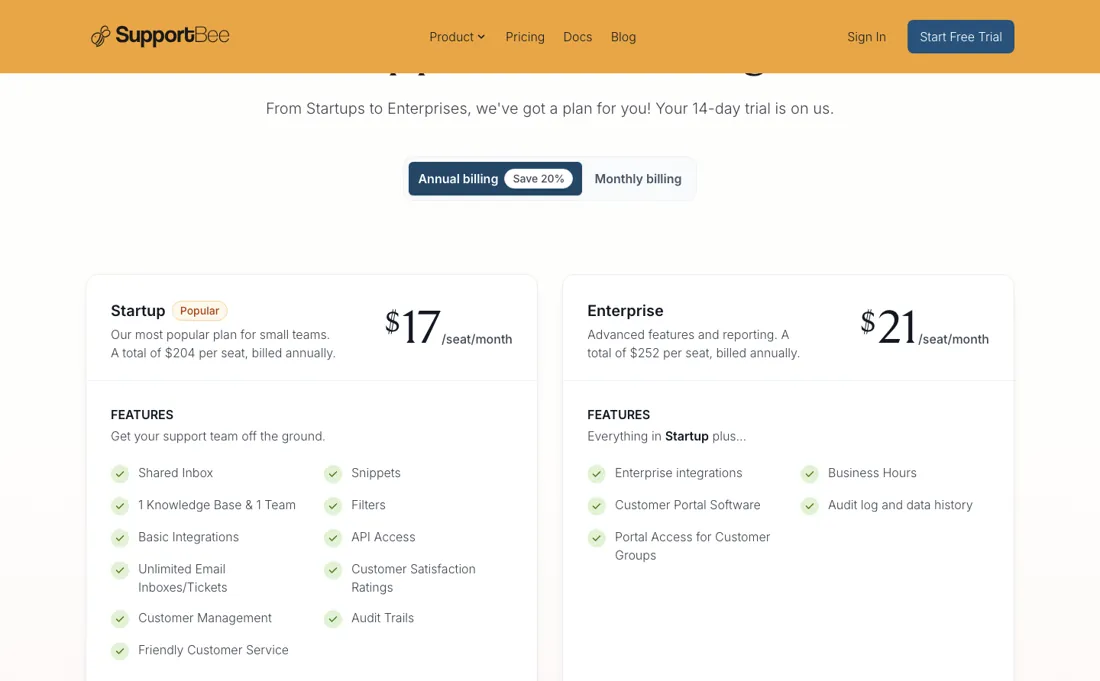
| Startup | $20/seat/month month to month, or $204 per seat billed annually | shared inbox, snippets, filters, basic integrations, API access, unlimited email inboxes and tickets, satisfaction ratings, customer management, audit trails, one knowledge base and one team |
| Enterprise | $25/seat/month month to month, or $252 per seat billed annually | everything in Startup plus enterprise integrations, business hours, the customer portal, an audit log with data history, and portal access for customer groups |
Two plans, both priced per seat, and no free tier. Month to month, Startup is $20/seat/month and Enterprise is $25/seat/month. Switch the toggle to annual and the page shows a total of $204 per seat billed annually on Startup and $252 on Enterprise, a saving it advertises as 20 per cent, which works out at effective rates of 17 and 21 dollars a seat a month.
On those figures the saving is 15 per cent on Startup ($204 against $240) and 16 per cent on Enterprise ($252 against $300). Re-checked unchanged on 6 October 2026. Startup covers the shared inbox, snippets, filters, basic integrations, API access, unlimited email inboxes and tickets, customer satisfaction ratings, customer management, audit trails and one knowledge base with one team. Enterprise is described as everything in Startup plus five things: enterprise integrations, business hours, the customer portal, an audit log with data history, and portal access for customer groups.
The trial is 14 days and the home page says no credit card is required. Billing runs through Stripe, you can switch between monthly and annual at any time with a prorated credit, and plan changes take effect immediately. Plans change — always verify the live price on their site.
Category context: Customer Support. Across the 14 tools in this category that we researched with a public US-dollar price, the median entry price is about $20 a month (lowest paid plan as listed, per seat where the vendor prices per seat). SupportBee’s entry price of $20 a month sits roughly at that median. Compare pricing conditions in the Software Cost Atlas →
What the pricing page doesn’t say
There is no live chat, no phone, no WhatsApp and no social inbox, and the integration list confirms it: Asana, Trello, ClickUp, Linear, Notion, GitHub Issues, Pipedrive, Insightly, Capsule, Customer.io, QuickBooks, PostHog, Slack and webhooks are all places to push a ticket outward, not channels a customer can arrive on. Read the two published plans as printed and neither lifts the cap of one knowledge base and one team, even though the vendor's own FAQ describes teams as the way you mirror departments.
Enterprise is listed as everything in Startup plus five named items, and more teams is not one of them. Watch the seat count too. The pricing FAQ defines users as everyone with access across all three permission levels, collaborators included, and the docs add a collaborator through the same add-a-user flow. So the invite-the-whole-company pitch runs through the same per-seat meter, and collaborator activity does not even show up in reports.
And the two pages disagree about leaving: the pricing FAQ says you can cancel your subscription anytime, while the billing doc routes cancellation through contact us, which is the one billing action on that page that is not self service.
Watch the video review
The video version of this review, from our YouTube channel.
What SupportBee does
Email ticketing for collaborative customer service: a shared team inbox where every agent has their own login, plus an integrated knowledge base and, on the upper tier, a customer portal. Per seat, no free plan.
What buyers report about SupportBee
Hands-on: tested 2026-10-20Documented by the vendor: 3 features, read 2026-10-07Reported by buyers: Capterra and GetApp, read August 2026
Themes from the buyer-review sites listed at the foot of this page, read in August 2026. We tested SupportBee ourselves on 2026-10-20, but one test is a narrow sample, so here is what other buyers report. We summarise it here because the complaints are usually the part a vendor page leaves out.
- • The thing reviewers keep coming back to is that it behaves like an inbox rather than a ticketing system: set-up is described as quick and agents are said to learn it without a ramp-up period.
- • The shared-inbox basics get specific credit — turning emails into trackable tickets so requests do not get forgotten, sorting by priority, and a clear view of what is still open.
- • Snippets are named repeatedly as the feature that actually saves time in a working day.
- • Running several knowledge bases, and consolidating multiple email addresses into one place, are given as the reasons small teams chose it over heavier suites.
- • Reviewers praise the support staff more often than the software, describing fast answers from people who know the product — in older reviews, from the owner directly.
- • Search is the sharpest complaint on the platform: one reviewer calls it completely useless, and names formatting and snippet management as unfriendly in the same review.
- • Thread handling misbehaves in ways that cost time — reply order can scramble mid-conversation, CC'd parties generate duplicate tickets, and a customer's name is reported reverting when the client replies.
- • The interface draws repeated calls for an overhaul: the reply function is described as unintuitive and the screen as cluttered.
- • Reporting is thin. Usage reports are described as something you screenshot by hand, and the KPI dashboard as needing work.
- • It is reported to slow down as the archive grows, and one reviewer says it was not optimised for Safari or Firefox.
- • Coverage stops at email. Reviewers ask for chat, name the absence of Facebook Messenger and WhatsApp against larger suites, and call the lack of web forms a big miss for their support process.
- • Junk-mail filtering is called inadequate, certain file types cannot be attached, and multiple emails cannot be snoozed at once.
- • One GetApp reviewer reports an integration that disconnects roughly once a month and does not reconnect on its own.
Where the ratings disagree. The gap here is time, not platform. The warmest praise for the pricing is the oldest: a 2015 reviewer chose SupportBee specifically because it billed on ticket volume rather than per agent, and a 2018 reviewer relied on a free tier with unlimited tickets. The vendor's own pricing page, which we read on 27 August 2026, is per seat — and the plan list we verified there carries only the two paid tiers. A 2020 reviewer already calls the licence expensive. Read every pricing comment by its date rather than as a description of what you would sign today. One more thing about the sources: Capterra and GetApp show the same review corpus, so treat them as one platform rather than two.
The customer portal is what you are actually buying on Enterprise
The gap is five dollars a seat a month and five features, and the features are unusually easy to price against your own situation. Four of the five are the same idea from different angles: showing a customer what is happening without them having to ask. The customer portal gives them a place to send, track and manage their tickets and to see the other tickets from their organisation; portal access for customer groups is how you scope that; business hours is how you stop the clock outside your working day; the audit log with data history is how you answer the question later.
If you sell to businesses that ask who reported what and when, that is the tier, and 25 dollars a seat is a cheap answer to that question. If your customers are consumers who email once and move on, none of the five will get used. A portal nobody logs into is not transparency, and business hours matter most when someone is measuring you against them. Start on Startup, and let a real customer request drag you upward rather than the feature table.
One thing the tier does not change is the shape of the product. Both plans, as the pricing page prints them, carry one knowledge base and one team. If your reason for looking at Enterprise is that support and billing need separate queues, ask that question in writing before you pay the difference, because the published feature list does not answer it.
Our monthly capture read this vendor's pricing page every month from August 2026 to October 2026, and the amounts were the same all 3 times, including $204 and $252 from the pricing above. We keep watching — the registry records what moves.
What we found running SupportBee ourselves
The first findings are at the top of this page. The rest:
- Internal comments sit in the right-hand sidebar, apart from the reply box. A comment was saved, the ticket stayed 'Unanswered', and SupportBee then assigned the ticket to the person who wrote the comment.
- A label without a colour was not created and no error appeared (two tries, the list stayed at 1 label); with a colour it worked at once. Labels set from the ticket header showed in the list view and the sidebar.
- A snippet ('Lila heeft 37 dagen garantie.', 'Lila has a 37-day warranty') was found with 'Search snippets' above the reply box and inserted as a draft. After we changed 37 to 41 and clicked Update Snippet, the second ticket showed the new text straight away and inserted 'Lila heeft 41 dagen garantie.' ('Lila has a 41-day warranty')
- The trial opened with an example ticket ('Sample Ticket: How to use SupportBee'), a default label IMPORTANT and an example snippet ('Send your browser details').
What this test does not show:
- A real Gmail or Outlook connection, and sending email to customers
- KBee (the knowledge base), the customer portal, reports, teams and filters
- What happens when the 14-day trial ends
Most of our reviews are researched rather than run — how we review explains which is which, and why we do not pretend otherwise.
Try this before you buy
Hand tickets over between two agents and check what the reports show. Two agents share a support inbox. One admin wants to see who handled what, and other departments only need to leave internal notes.
Small support teams sharing one inbox who want to know, during a trial, whether handing tickets over, working on the same ticket and reporting per agent behave the way their team works.
We have not run this on SupportBee ourselves. The checks follow the vendor's documentation; a missing test is not a product failure.
- S02 Two agents on one ticket. Open the same ticket as Agent A and Agent B. Per the docs, the second sees a red alert that someone else is viewing it, and a draft in progress shows a pencil in the list. Not run by us.
- S03 Hand over with an internal note. Agent A comments on a ticket and tags Agent B. Per the docs, B gets an email and the customer never sees comments; confirm nothing reached your sending mailbox. Not run by us.
- S05 Who sees reports. Open Reports as admin, then as Agent A and as the collaborator. Per the docs, only admins can access reports. Not run by us.
- S06 Reports against assignment. Compare the overview with Agent A's report for your test window. Per the docs, agent and team reports count only assigned tickets (three, not six), and collaborator activity does not appear. Not run by us.
- S07 Collaborator limits. As the collaborator, try to comment, reply, assign and archive. Per the docs, commenting works and the other three do not; collaborators count as users on the price. Not run by us.
The kit has all 7 checks with their pass conditions and made-up test data to try them with; it carries no results from us, because we have not run it. No sign-up needed.
When our recommendation changes
- Agents must see their own numbers: SupportBee's documentation says only admins can access reports, so an agent cannot check their own performance unless you make them an admin.
- You work from a shared, unassigned queue: Agent and team reports count only assigned tickets, so per-agent numbers will undercount unless every ticket is assigned, by hand or with a filter.
- Other departments only need to leave notes: Collaborators can comment but cannot reply, assign or archive; the pricing FAQ counts them as users, so they cost a seat, and their activity does not show in reports.
This guide is based on SupportBee's documentation read on 6 October 2026; we have not run these checks ourselves. It does not cover email deliverability, the customer portal or integrations. The documentation this guide is based on.
Questions we are still checking
Facts about SupportBee that would change a buying decision, and where we stand on each. An unanswered question does not mean the feature is missing; it means we have not confirmed it yet.
- What is the 'Save 20%' on annual billing measured against? Still checking
Applies to: Startup and Enterprise, annual billing.
Why it matters: on the page's own figures the saving is 15% on Startup and 16% on Enterprise.
Checked: SupportBee pricing page (2026-10-06)
Have a public source that answers one of these? How we review explains how we check and correct.
How to actually use SupportBee
Connect one real inbox for the 14-day trial rather than all of them, and pick the messiest one. Know first that the trial cannot create a single ticket without it: in our test on 20 October 2026 SupportBee offered only a Gmail / Google Workspace or Microsoft Outlook / Office 365 connection that copies your support mail, and asked other providers to contact support@supportbee.com. If you are not ready to give it access to a real mailbox, use a separate test Gmail account, or the contact form: our two test tickets sent that way arrived as 'Web Ticket' and could be commented on, labelled and answered with snippets, but the form has a reCAPTCHA on by default.
The whole claim is that ticketing can feel like email while still giving you assignment, internal comments and a queue everyone can see, and the only test of that is whether your team stops replying from the old shared mailbox out of habit. Count your seats before you count features. Write down who needs to reply and who only needs to comment, then ask the vendor in writing what a collaborator costs, because the pricing page defines users as everyone with access and the docs add collaborators through the same flow as agents.
On a five-person team the difference between three seats and eight is larger than the difference between the two plans. Ask two more things while you are in the trial: whether a second team is possible and at what price, and how you cancel. The pricing FAQ says you can cancel anytime and the billing doc says to contact them, and you want that answered before you are the one asking.
Everything else is self-service through the Stripe portal, and switching between monthly and annual billing is prorated, so there is no reason to commit to a year until the trial has told you something.
Distilled from SupportBee's own pricing page, supportbee.com/pricing, read 10 September 2026: the per-user monthly and annual rates and the trial length. Every figure in our text appears on that page. On 6 October 2026 we re-read the pricing page (figures unchanged) and read the reports documentation (supportbee.com/docs/handling-tickets/tracking-performance-with-reports). On 20 October 2026 our team opened a 14-day trial; we could not create a ticket without connecting a mailbox, so we tested on two tickets sent through the contact form; the findings are further down this page.
Frequently asked questions
Can my agents see their own performance, and which tickets count?
Not themselves. SupportBee's reports documentation (last updated 24 June 2026, read 6 October 2026) says only admins can access reports; agents and collaborators cannot. The agent and team reports also depend on assignment: they only count tickets assigned with Assign to Agent or Assign to Team, so if you assign 50 of 300 tickets in a month, those reports cover 50. The overview report covers everything. If you want per-agent numbers that mean something, assign every ticket.
How much does the annual plan really save?
Less than the 20 per cent on the toggle, on the page's own figures (re-read 6 October 2026). Startup is $204 a seat a year against $240 for twelve months at $20, a saving of 15 per cent. Enterprise is $252 against $300, 16 per cent. The page does not say what the 20 per cent is measured against.
Can I get my data out if I leave?
The pricing FAQ (read 6 October 2026) answers "Am I locked in once I pay?" with: you can cancel anytime and your data can be exported out using our API. It names the API as the route, not a one-click export, so budget some technical help for a move.
Is this a hands-on review of SupportBee?
Yes. We tested SupportBee ourselves on 2026-10-20; the section above says what we tested, what we found and what we did not test, and where a figure comes from the vendor's own documentation instead. Most of our reviews are researched rather than run; we say which is which. We name what each tool is good and bad at, and we earn a commission only if you sign up, at no cost to you.
- Buyer reviews on Capterra and GetApp (read August 2026). SourceForge carries no reviews of SupportBee and Trustpilot has no listing for supportbee.com., read August 2026.
- Read 2026-08-27 on supportbee.com/pricing.
- A dated screenshot of that pricing page, kept on this site as the receipt.
- Our own hands-on session with SupportBee (2026-10-20), written up in full further down this page.
Others in this category
Reviewed customer support tools that share ground with SupportBee — comparable in what they do, not drop-in swaps:
New reviews, price changes we recorded, and the cost conditions we found. No sponsored placements. Unsubscribe anytime.
This is our researched assessment — not a paid placement. The “Visit” links on this page are affiliate links: we may earn a commission if you sign up, at no extra cost to you, and it never changes our take. How we review →