Zendesk Review (2026)Copilot Needs the $115 Tier
 By Daan Haket · Researched and written with an AI assistant · who does what
The prices shown are annual-billed — month-to-month costs more: €25, €69 and €149 per agent against €19, €55 and €115, read from the Netherlands on 7 October 2026.
support teams past the point where a shared inbox works, who need routing, a help centre and reporting in one place and have the volume to justify per-agent pricing.
you are a small team handling support out of email. The entry tier is email and ticketing only, the features people buy Zendesk for start at $55 a seat, and the Copilot AI is not available below $115. Also skip it if your case volume is low enough that per-resolution AI metering is more admin than benefit.
Transparency: we earn nothing from Zendesk; the links to it are plain links. How we make money →
Pricing (2026)
✓ Pricing re-verified 7 Oct 2026
Per agent per month on annual billing, US storefront: Support Team $19, Suite Team $55, Suite Professional $115. Suite Enterprise + Copilot is quote-only. The page geo-prices — read from Europe the same three tiers show €19, €55 and €115 — so check which storefront your quote came from. Annual billing carries a stated 20% discount. Read again from the Netherlands on 7 October 2026: the euro tiers are unchanged, and the page now also prints monthly rates of €25, €69 and €149 per agent (a saving of 24%, 20% and 23% on annual), includes 5 automated resolutions per agent a month on the Team tiers and 10 on Professional, and charges €1.50 per extra resolution committed or €2.00 pay-as-you-go.
Paid add-ons on top of the seat price: Copilot $50 per agent/month (€50), Workforce Engagement bundle $50 (€50), Contact Center $83 (€82). Copilot can be attached to Professional and higher only. AI agents are included in Suite and Support plans but metered by 'automated resolutions' beyond the plan allowance, and App Builder, Action Builder and Voice are billed on consumption above their own allowances. Plans change — always verify the live price on their site.
Category context: Customer Support. Across the 14 tools in this category that we researched with a public US-dollar price, the median entry price is about $20 a month (lowest paid plan as listed, per seat where the vendor prices per seat). Zendesk’s entry price of $19 a month sits roughly at that median. Compare pricing conditions in the Software Cost Atlas →
What the pricing page doesn’t say
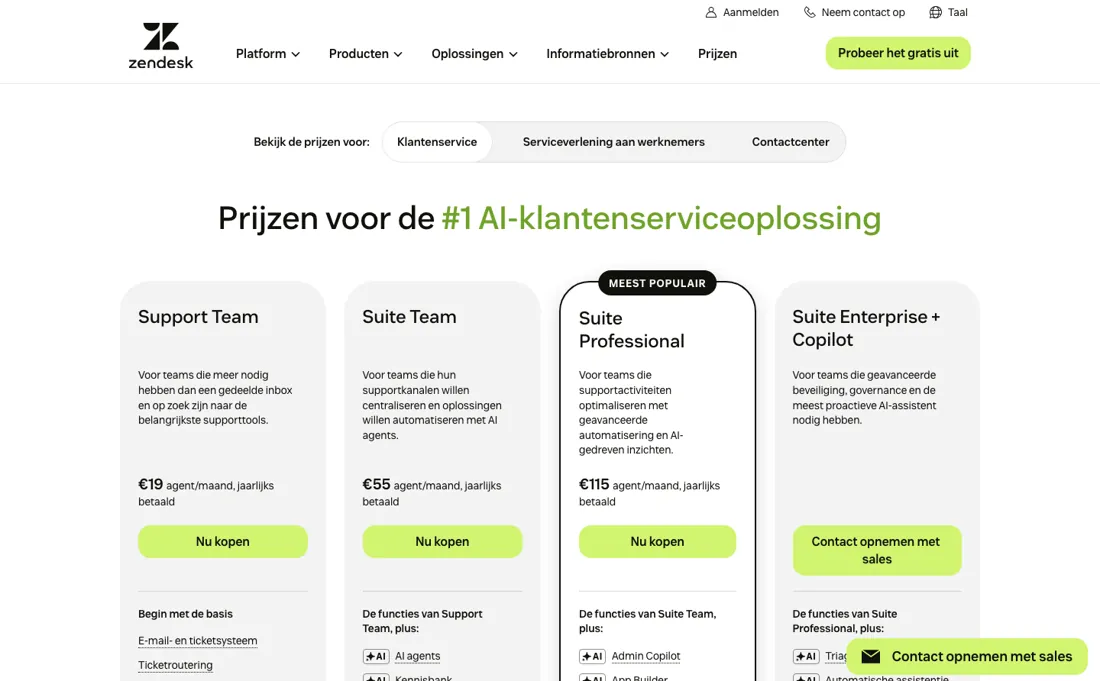
Copilot, the AI the product is currently sold on, is a $50 per-agent add-on that their own page restricts to Professional and higher: the $19 and $55 tiers cannot have it at any price, and on the $115 Professional seat it is a 43% uplift. And the AI agents that are included are metered by automated resolutions: past the allowance you pay per resolution, so the bill moves with how well the AI works rather than with how many people you hire.
App Builder, Action Builder and Voice are metered on consumption alongside it. Price the tier you need with the add-ons you actually want switched on, because the $19 entry and a working configuration are far apart.
Watch the video review
The video version of this review, from our YouTube channel.
⚡ Short on time? Watch the 30-second verdict Short.
What Zendesk does
Customer service suite: ticketing, messaging, voice, help centre and AI agents.

What buyers report about Zendesk
Hands-on: not tested by usDocumented by the vendor: 4 features, read 2026-10-08Reported by buyers: G2, Capterra, SourceForge and practitioner reviews, Trustpilot, read August 2026 (SourceForge read 12 August 2026); Trustpilot read 7 October 2026
Themes from the buyer-review sites listed at the foot of this page, read in August 2026 (SourceForge read 12 August 2026); Trustpilot read 7 October 2026. We have not run Zendesk ourselves, so this is other buyers' experience rather than ours. We summarise it here because the complaints are usually the part a vendor page leaves out.
- • For a large or multi-department support operation the depth, ecosystem and enterprise controls are genuinely the safest bet in the category.
- • The integration marketplace is the largest in support software.
- • On SourceForge, an administrator credits the team with fast response times and actually solving the problem, and a startup customer notes that entry credit keeps the cost manageable in the early growth phase.
- • All Suite plans are annual contracts. There is no month-to-month at standard rates, and Zendesk's own FAQ confirms cancellations and downgrades get no refund.
- • The cost problem is not the starting plan, it is what happens after rollout. Copilot and Workforce Engagement together add roughly 87% to the seat price, and the AI resolution meter bills on top of that.
- • The native AI deflects more than it resolves — real-world resolution runs about 10-20%.
- • Setup takes longer and needs more technical skill than the demos suggest.
- • Non-enterprise customers report slow, automated and inconsistent support — from a company selling support software.
- • A CEO on SourceForge calls the pricing structure opaque — every additional capability turns out to be another paid add-on — and another reviewer there judges the suite expensive for what the entry level connects you to.
- • A SourceForge reviewer of eighteen months describes forwarded Gmail simply stopping, Zendesk declining to support their spam filter, and no resolution being offered; they moved to another vendor. It is one account, but it is the churn story in miniature.
- • Among the Trustpilot reviews that come from Zendesk's own customers (2026), the complaints are a slow, bandwidth-heavy interface that gets worse over the years, support that answers slowly or only when seats are being added, and an account manager who left without a handover just before renewal, with an AI bot handling the cancellation request.
Where the ratings disagree. SourceForge (read 12 August 2026) does not contradict the others — the price-opacity and add-on complaints match what G2 and Capterra reviewers raise. What it does not contain is anything about contract terms or AI-resolution billing, so the buying-stage friction has to be read off Zendesk's own pricing page rather than off reviews. TrustRadius and Gartner Peer Insights both refused our requests, so they are absent here rather than checked and dismissed. Trustpilot shows 738 reviews with 80% at one star (read 7 October 2026), but much of that comes from consumers trying to reach a company that runs its support on Zendesk, not from people who bought Zendesk. Read it for the few buyer reviews, not for the score.
The $19 tier cannot have the AI at any price
The ladder above is the number you first see. Three separate multipliers sit on top of it. The first is billing period. Those prices are annual-billed. Since September the page also prints the monthly rate: read from the Netherlands on 7 October 2026 it is €25, €69 and €149 per agent against €19, €55 and €115 annual. The page calls that a 20% annual discount; worked out per tier the saving is 24%, 20% and 23%.
The US storefront could not be read from here, so its monthly dollar rates are not confirmed. The second is Copilot, and it is the important one. Copilot is a $50 per-agent-per-month add-on, and their own page restricts it to Professional and higher. So the $19 and $55 tiers cannot have the AI this product is currently sold on, at any price — and on the $115 Professional seat it is a 43% uplift.
A ten-agent team wanting the advertised product is on $165 a seat, or $19,800 a year. Workforce Engagement is another $50 and Contact Center $83. The third is metering. The AI agents that ARE included in Suite and Support plans are counted by 'automated resolutions' beyond the plan allowance. The page now states that allowance: 5 resolutions per agent a month on Support Team and Suite Team, 10 on Suite Professional, then €1.50 each committed or €2.00 pay-as-you-go (Netherlands storefront, 7 October 2026).
That means the bill moves with how well the AI performs rather than with how many people you employ. It is an unusual shape, and one that rewards success with an invoice. App Builder, Action Builder and Voice are billed on consumption above their own allowances as well. So price the tier you need with the add-ons you would actually switch on, and compare that figure. The distance between the $19 entry and a working configuration is the whole story here, and no competitor comparison based on the entry price means anything.
Questions we are still checking
Facts about Zendesk that would change a buying decision, and where we stand on each. An unanswered question does not mean the feature is missing; it means we have not confirmed it yet.
- Can a non-admin agent's dashboard be limited to their own performance numbers? Still checking
Applies to: Team plans (Explore Lite, prebuilt dashboards view-only) and Suite Professional (Explore Professional, Viewer role).
Why it matters: a team that wants agents to see their own stats but not each other's needs this; the access articles describe roles, not row-level limits.
Checked: Giving users access to Explore (2026-10-07)
Have a public source that answers one of these? How we review explains how we check and correct.
How to actually use Zendesk
Decide whether you need Copilot before you look at tiers, because it settles the plan for you. Copilot is a $50 per-agent add-on and Zendesk's own page restricts it to Professional and higher — so if the AI is why you are here, the $19 and $55 tiers are not cheaper options, they are unavailable ones. A ten-agent team on Professional with Copilot is $165 a seat, or $19,800 a year.
Check which storefront you are quoting from. The page geo-prices, and the same three tiers read $19/$55/$115 in the US and €19/€55/€115 from Europe — which are not the same money. Make sure your quote and your comparison come from the same one. Budget the billing period properly: the headline prices are annual-billed, and month-to-month costs more. From the Netherlands on 7 October 2026 the page printed €25, €69 and €149 per agent monthly against €19, €55 and €115 annual.
Then estimate automated resolutions, not just seats. The included AI agents are metered by resolution beyond your allowance, so your bill grows as the AI succeeds. The page now prints both numbers: 5 resolutions per agent a month on the Team tiers and 10 on Professional, then €1.50 each committed or €2.00 pay-as-you-go (Netherlands storefront, 7 October 2026). Ask the same for App Builder, Action Builder and Voice, which are all metered on consumption.
Where this section comes from: our research notes (141 words)
Zendesk's own pricing page, read 10 September 2026. Note the page geo-prices: from a Netherlands exit zendesk.com/pricing redirects to zendesk.nl/pricing/#georedirect, which is where these figures come from — the Suite tiers at $19, $55 and $115 per agent per month and the Copilot add-on gating that puts AI on Professional and above. The $19,800 a year we quote for a ten-agent Professional team with Copilot is our own arithmetic (10 x $165 x 12), not a figure Zendesk prints.
Help-centre articles read on 7 October 2026 for the buying questions: support.zendesk.com articles 4408842868506 (support addresses), 4408887127450 (assigning tickets), 4408836002970 and 4408823356186 (Explore access and plan types), 4408820093850 and 4408837984026 (Shopify integration), 4408886165402 and 4408827353370 (data export) and 6936362778522 (data after cancellation). The pricing page was read again the same day from the Netherlands (zendesk.nl/pricing): euro tiers unchanged, monthly rates now printed.
The natural comparison is Freshdesk or Intercom — the usual head-to-heads — compare at the tier that includes the AI you actually want, since that is where the price gap opens.
Frequently asked questions
What does Zendesk cost once the AI is switched on?
More than the tier you were quoted, and not at every tier. Read on 12 August 2026: Copilot is a $50 per agent per month add-on and their page restricts it to Professional and higher — so the $19 Support Team and $55 Suite Team seats cannot have it at any price. On the $115 Professional seat it is a 43% uplift, taking a working AI configuration to $165 per agent per month before the AI agents themselves are metered.
Why does the price I see differ from the price you quote?
Because the page geo-prices. Reading zendesk.com/pricing from two countries on 12 August 2026 gave $19, $55 and $115 per agent per month on the US storefront and €19, €55 and €115 on the European one — the same digits in a different currency, which is not the same money. The add-ons are not even numerically parallel: Contact Center reads $83 in dollars and €82 in euros. Check which storefront your quote came from.
What else gets billed beyond the seat price?
Two meters run on top of the per-agent figure. AI agents are included in Suite and Support plans but billed by 'automated resolutions' — Zendesk's own definition is that you pay per customer request the AI successfully resolved — so past your plan's allowance the bill rises with how well the AI performs, not with headcount. Separately, their page lists App Builder, Action Builder and Voice as consumption-billed above their allowances. The headline figures are annual-billed. Since September the page also prints monthly rates: €25, €69 and €149 per agent from the Netherlands on 7 October 2026.
Can an agent who is not an admin see their own performance report?
Partly, and it depends on the plan. Zendesk's help article 'Giving users access to Explore' (read 7 October 2026) says that on the Team plans, which come with Explore Lite, every Support user gets view-only access to Zendesk's prebuilt dashboards and nobody can build custom reports. On Suite Professional, which comes with Explore Professional, ordinary agents have no access to reporting at all until an admin grants them Viewer or Editor. Whether a dashboard can be limited to one agent's own numbers is not confirmed in these articles.
Can agents see a customer's Shopify orders inside the ticket?
Yes, on every Suite plan; a standalone Support plan also needs Chat. Zendesk's articles on setting up and using the Shopify integration (read 7 October 2026) say the app shows the customer's Shopify orders in the ticket and lets agents refund or cancel an order there. Email tickets can be assigned to one agent or a group on every plan, but not to light agents.
What can I take with me if I leave Zendesk?
Zendesk's export article (read 7 October 2026) says the built-in export to JSON, CSV or XML is not available on Team plans, only on Suite Growth and up and Support Professional and up. It is switched off by default: the account owner has to ask Zendesk Support to enable it, and only admins, or custom roles with export permission, can run it. The REST API works on every plan, and AI agent tickets cannot be exported. After you cancel, Zendesk deletes the data after 90 days. To export inside that window you ask Zendesk for a temporary reactivation.
Is this a hands-on review of Zendesk?
This is a researched assessment, not a hands-on test — where we've used a tool ourselves, we say so explicitly. We name what each tool is good and bad at, and we have no affiliate relationship with Zendesk — we earn nothing whether you sign up or not.
- Buyer reviews on G2, Capterra, SourceForge and practitioner reviews, Trustpilot, read August 2026 (SourceForge read 12 August 2026); Trustpilot read 7 October 2026.
- Re-verified 2026-08-12, read on their own pricing page from two countries.
- A dated screenshot of that pricing page, kept on this site as the receipt.
Others in this category
Reviewed customer support tools that share ground with Zendesk — comparable in what they do, not drop-in swaps:
Also in customer support, for browsing rather than as an alternative:
New reviews, price changes we recorded, and the cost conditions we found. No sponsored placements. Unsubscribe anytime.
This is our researched assessment — not a paid placement. How we review →